User Scripts
Introduction
User scripts are a tool for creating custom scripts executed in GitFlic that interact with its entities. Scripts are executed in JavaScript, ECMAScript 2022 standard. Thanks to this feature, development teams can independently create integrations with third-party tools and services, and set up automation within GitFlic according to their own scenarios.
Another value of the tool is the open source code of integrations. To integrate your deployed GitFlic, simply copy the required files from the integrations repository and add them through the interface. This does not require complex configurations, deployments, or interaction with the GitFlic REST API.
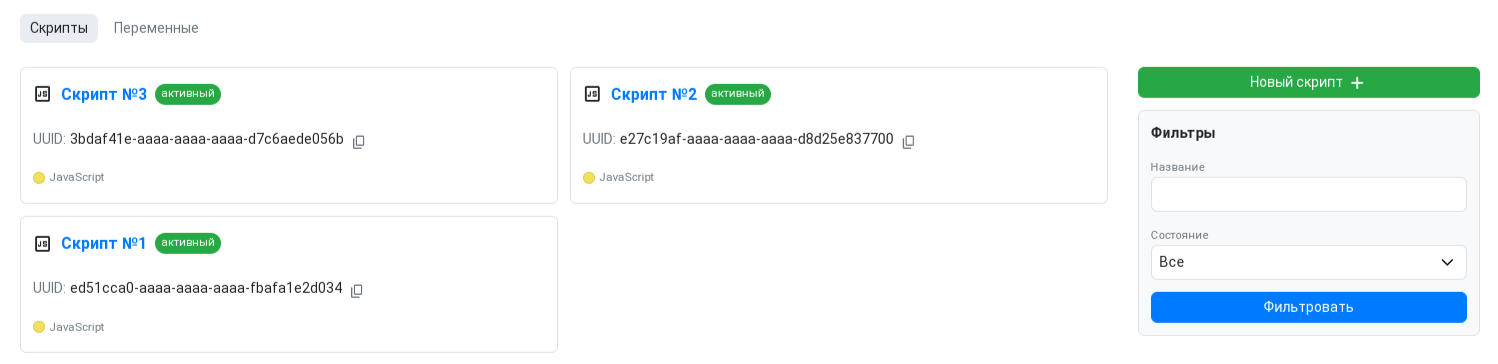
Usage
Interaction with entities is carried out through services—objects with a set of methods that allow you to create, modify, or retrieve existing entities in GitFlic. To better understand what services accept and return, several classes are defined:
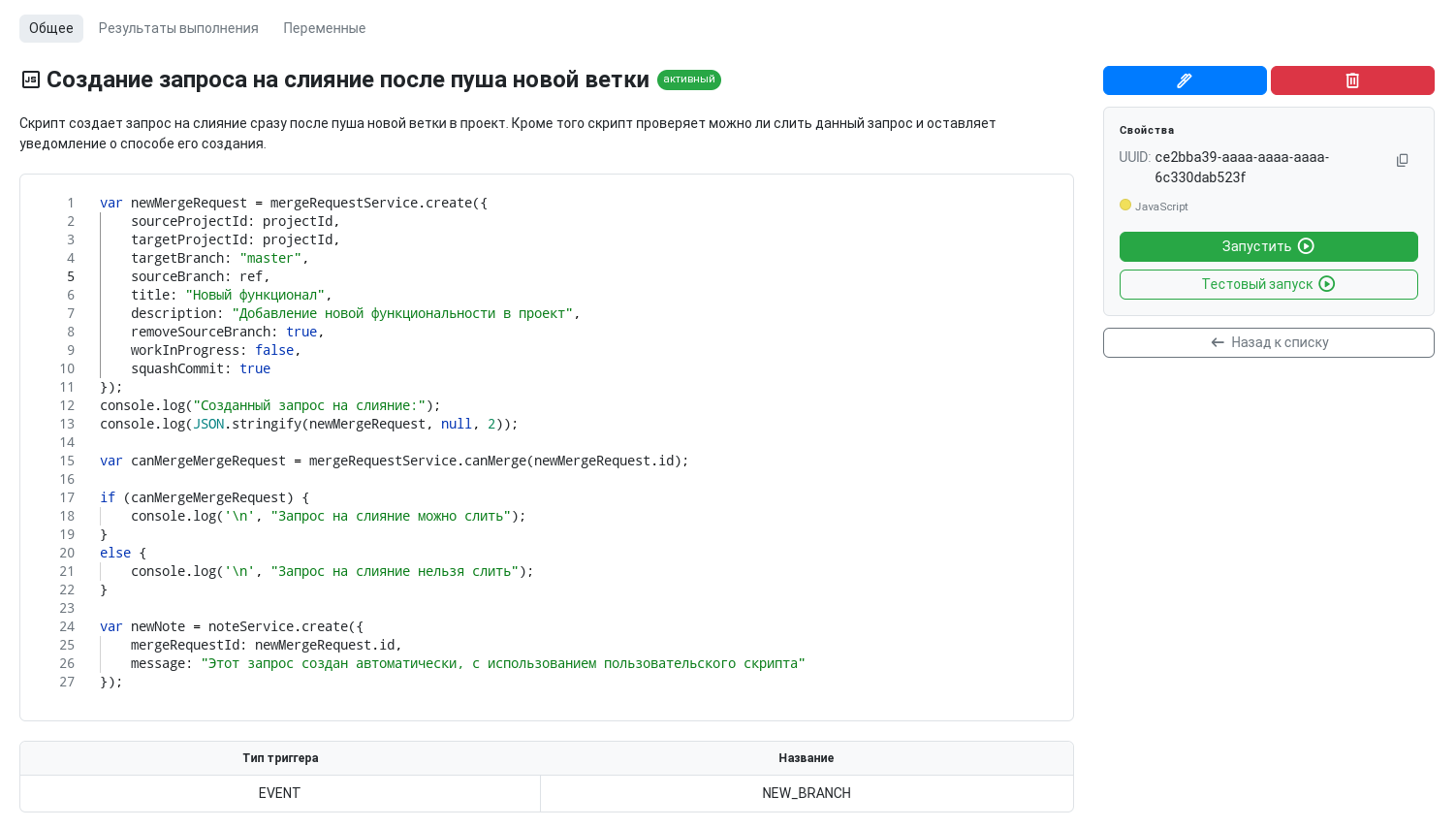
A page object contains the following data:
class Page<T> {...}
| Name | Data Type | Description |
|---|---|---|
page |
number | Current page number |
size |
number | Number of items on the current page |
pageSize |
number | Maximum number of items per page |
totalPages |
number | Total number of pages |
totalElements |
number | Total number of items |
elements |
T[] - array of entities | List of items |
Entities and Methods
You can find detailed information about entities and their methods at the links below:
| Method | Method Call |
|---|---|
| Create label | labelService.create |
| Edit label | labelService.edit |
| Get all labels | labelService.getAll |
| Get labels by UUID | labelService.findAllByIds |
| Method | Method Call |
|---|---|
| Create issue | issueService.create |
| Edit issue | issueService.edit |
| Get all issues | issueService.getAll |
| Get all issues with status | issueService.getAllWithStatus |
| Get issue by local number | issueService.findByLocalId |
| Get issue by UUID | issueService.findById |
| Method | Method Call |
|---|---|
| Create issue comment | issueNoteService.create |
| Edit issue comment | issueNoteService.edit |
| Get all issue comments | issueNoteService.findAll |
| Get issue comment by UUID | issueNoteService.findById |
| Get issue comment count | issueNoteService.countAll |
| Method | Method Call |
|---|---|
| Create merge request | mergeRequestService.create |
| Edit merge request | mergeRequestService.edit |
| Edit merge request status | mergeRequestService.editStatus |
| Get merge requests by source project | mergeRequestService.findAllBySourceProject |
| Get merge requests by target project | mergeRequestService.findAllByTargetProject |
| Find merge request by UUID | mergeRequestService.findById |
| Find merge request by local number | mergeRequestService.findByLocalId |
| Check if merge request exists | mergeRequestService.exists |
| Check if merge request can be merged | mergeRequestService.canMerge |
| Method | Method Call |
|---|---|
| Create merge request discussion | noteService.create |
| Edit merge request discussion | noteService.edit |
| Reply in merge request discussion | noteService.reply |
| Resolve merge request discussion | noteService.resolve |
| Unresolve merge request discussion | noteService.unresolve |
| Get all discussions in merge request | noteService.findAllInMergeRequest |
| Get merge request discussion by UUID | noteService.findById |
| Method | Method Call |
|---|---|
| Create pipeline | pipelineService.create |
| Create blank pipeline | pipelineService.createBlank |
| Get all pipelines | pipelineService.findAllByProject |
| Get pipelines by branch or tag | pipelineService.findByProjectIdAndRef |
| Get pipeline by local number | pipelineService.findByLocalId |
| Get pipeline by UUID | pipelineService.findById |
| Get pipelines in merge request | pipelineService.findByMergeRequestId |
| Restart pipeline | pipelineService.restart |
| Cancel pipeline | pipelineService.cancelPipeline |
| Change pipeline status | pipelineService.changeStatus |
| Update pipeline start time | pipelineService.setStartTime |
| Update pipeline finish time | pipelineService.setFinishTime |
| Change pipeline execution time | pipelineService.setExecutionTime |
| Create stage | pipelineService.createStage |
| Change stage status | pipelineService.changeStageStatus |
HTTP Requests
Currently, the following methods are supported for working with HTTP requests:
http.get(url: string, config?: RequestConfig) => HttpResponse
http.post(url: string, body: any, config?: RequestConfig) => HttpResponse
where RequestConfig and HttpResponse are the following classes (written in TypeScript):
interface HttpRequestConfig {
    url?: string;
    method?: string;
    baseUrl?: string;
    headers?: { [key: string]: string[] };
    params?: { [key: string]: string[] };
    data?: any;
    auth?: {username: string, password: string}
}
interface HttpResponse {
    body: any;
    isSuccessful: boolean;
    code: number;
    message: string;
    headers: { [key: string]: string[] };
}
Example usage:
Example of a GET request to the GitFlic REST API
const url = '${baseurl}/user/me'
req = http.get(url,{ headers: { "Authorization": `token ${gitflicApiToken}` }});

console.log(JSON.stringify(req))
req.code
Example of a POST request that does not require a body
const url = ${exampleUrl}
req = http.post(url,{},{headers: { "Authorization": `token ${token}` }});

console.log(JSON.stringify(req))
req.code
Example of a POST request with a body:
This example additionally requires declaring the variables BASEURL, TOKEN, and ID.
async function main() {
    try {
        console.log("URL:", BASEURL);
        console.log("Token length:", TOKEN.length);
        console.log('Sending request...\n');

        const response = await http.post(
            `${BASEURL}/bot${TOKEN}/sendMessage`,
            {"chat_id": `${ID}`,
             "text": "Hello from GitFlic"},
            {
                headers: {
                    'Content-Type': 'application/json'
                }
            }
        );
        console.log(JSON.stringify(response),'\n');

    } catch (error) {
        console.log("Error:", error.message);
        error
    }
}
main()
Permissions
When a script is created, its author is saved. The set of permissions the script author has will affect what functionality is available during the execution of this script.
For example, a user who does not have permission to create pipelines, but does have permission to work with scripts (this behavior can be achieved using a custom role), creates a script that creates a pipeline. This script will not create a pipeline, even if it is run by a user who has permission to create pipelines.
Variables
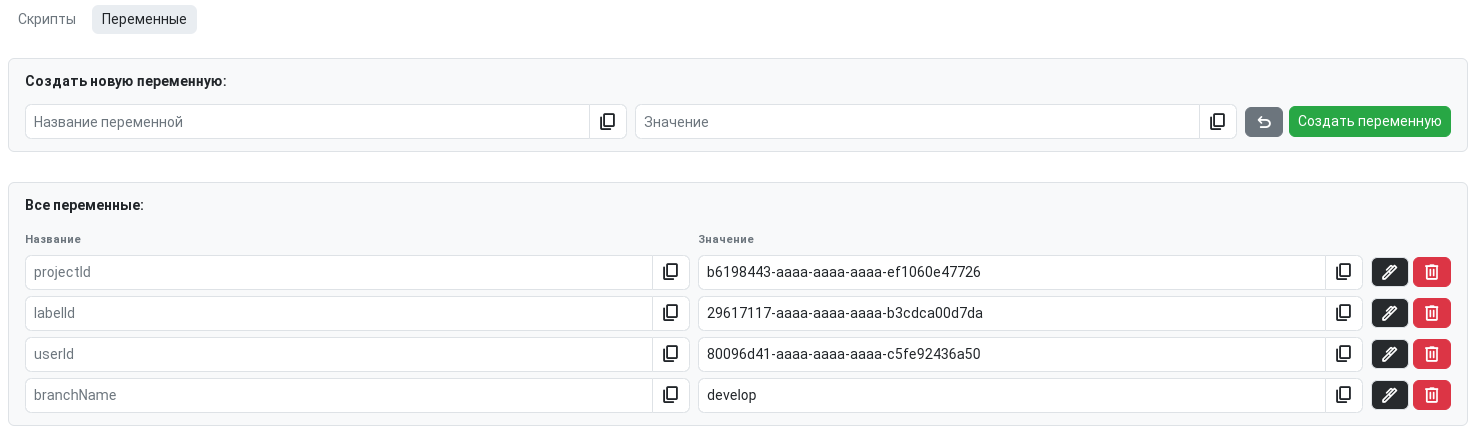
The Variables section contains the interface for adding and configuring script variables. In the Name field, specify the variable name; in the Value field, specify its value. Editing and deleting existing variables is done in the same section. To use variables in a script, you need to add them in the settings of each script individually.
Script Launch Methods
You can run a user script in several ways:
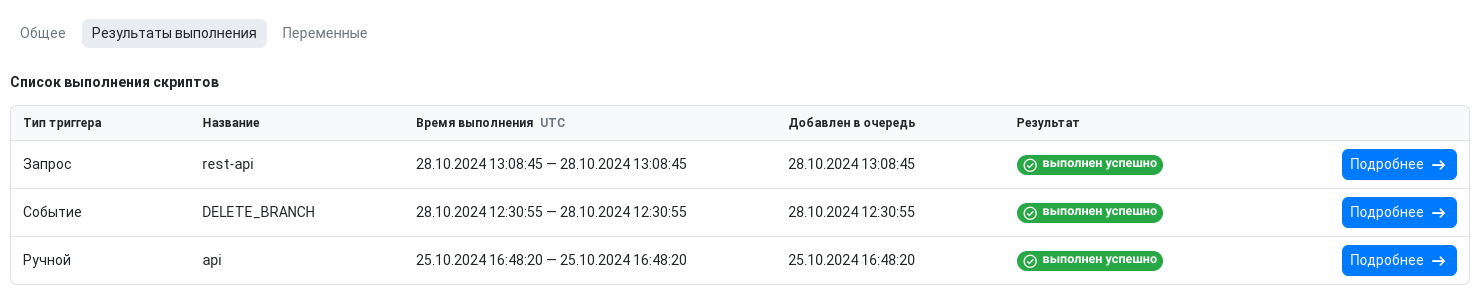
Launch from Web Interface
Any script can be run directly from the interface. To do this, go to the script itself and click the corresponding button in the script management section. There are two types of launches:
- Full launch - script execution with changes to the database. This type of launch is suitable for using tested scripts.
- Test launch - script execution without changes to the database. This type of launch is suitable for configuring and checking the operability of scripts.
REST API
You can execute a script using this REST API request. Instructions for obtaining an access token to work with the public API can be found here.
POST {baseUrl}/rest-api/project/{userAlias}/{projectAlias}/script/{uuid}
| Path Variable | Type | Description |
|---|---|---|
baseUrl |
String | The URL to which the request will be sent |
ownerAlias |
String | Project owner's alias |
projectAlias |
String | Project alias |
scriptUuid |
String | UUID of the script to execute |
The
{baseUrl}variable depends on your GitFlic configuration. For example, it can be:localhost:8080
The request returns the following information:
| Parameter | Type | Description |
|---|---|---|
executionUuid |
String | UUID of the execution result |
scriptUuid |
String | UUID of the user script |
triggerType |
String | Trigger type. Always returns REQUEST |
triggerName |
String | Trigger name. Always returns rest-api |
triggeringUserUuid |
String | UUID of the user who triggered the script |
executionStartTimestamp |
Long | Script execution start time |
executionEndTimestamp |
Long | Script execution end time |
queueAppendTimestamp |
Long | Time when the script was added to the execution queue |
result |
String | Execution result. Possible values: SUCCESS - successful execution, RUNTIME_ERROR - runtime error, TIME_EXCEEDED - execution time exceeded, UNKNOWN_ERROR - unknown error |
returnedValue |
String | Returned value |
Triggers
To automatically execute a script after a specific event occurs, use triggers. You can add up to 10 different triggers to a single script.
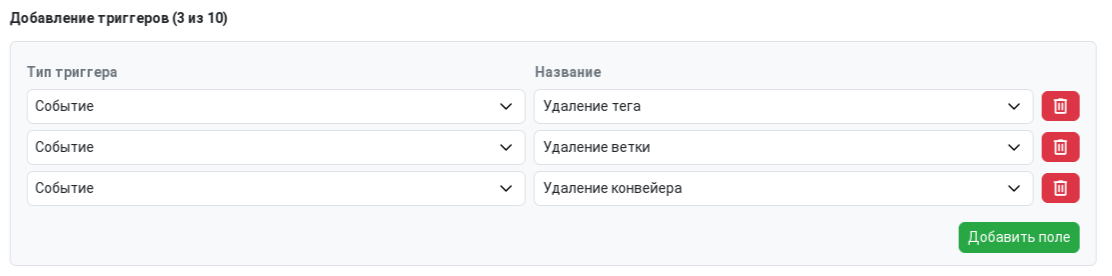
There are several trigger groups. Each event in a group returns additional environment variables:
Pipelines
- New pipeline
NEW_PIPELINE - Successfully finished pipeline
SUCCESS_PIPELINE - Failed pipeline
FAIL_PIPELINE - Pipeline deletion
DELETE_PIPELINE
| Variable Name | Type | Description |
|---|---|---|
projectId |
string | UUID of the project related to the pipeline |
userId |
string | UUID of the user who triggered the event |
authorUsername |
string | Username of the user who triggered the event |
status |
string | Pipeline status at the time of the event |
localId |
number | Local pipeline number |
ref |
string | Git reference to the tag or branch where the pipeline was started |
isTag |
boolean | true if the pipeline was created on a tag, false for a branch |
commitAfter |
string | Commit hash where the pipeline was started |
Merge Requests
- Merge request creation
NEW_MERGE_REQUEST - Merge request update
UPDATE_MERGE_REQUEST - Merge request merge
MERGE - Merge request close
CLOSE_MERGE_REQUEST - Merge request cancel
CANCELED_MERGE_REQUEST
| Variable Name | Type | Description |
|---|---|---|
sourceProjectId |
string | UUID of the source project of the merge request |
targetProjectId |
string | UUID of the target project of the merge request |
localId |
number | Local merge request number |
authorId |
string | UUID of the merge request author |
authorUsername |
string | Username of the merge request author |
assignedUsers |
string[] | List of approvers in the merge request |
targetBranch |
string | Target branch of the merge request |
sourceBranch |
string | Source branch of the merge request |
title |
string | Merge request title |
description |
string | Merge request description |
status |
string | Merge request status at the time of the event. Possible values: OPENED, MERGED, FAILED, CONFLICT, CANCELED, CLOSED, REVERTED |
Merge Request Discussions
- Creating a comment in a merge request discussion
NEW_MERGE_REQUEST_NOTE
| Variable Name | Type | Description |
|---|---|---|
projectId |
string | UUID of the project where the merge request discussion was created |
userId |
string | UUID of the discussion author |
message |
string | Discussion content |
authorUsername |
string | Username of the discussion author |
noteId |
string | UUID of the created discussion |
status |
string | Discussion status. Possible values: RESOLVED and UNRESOLVED |
Issues
- Issue creation
NEW_ISSUE - Issue update
UPDATE_ISSUE - Issue close
CLOSE_ISSUE
If both "Issue Update" and "Issue Close" triggers are selected, the script will run twice when an issue is closed.
| Variable Name | Type | Description |
|---|---|---|
projectId |
string | UUID of the project related to the issue |
localId |
number | Local issue number |
authorId |
string | UUID of the issue author |
authorUsername |
string | Username of the issue author |
title |
string | Issue title |
assignedUsers |
string[] | List of assignees in the issue |
status |
string | Issue status at the time of the event. Possible values: OPEN, IN_PROGRESS, CLOSED, COMPLETED |
Issue Comments
- Creating a comment on an issue
NEW_ISSUE_NOTE
| Variable Name | Type | Description |
|---|---|---|
projectId |
string | UUID of the project related to the issue |
issueLocalId |
number | Local issue number |
message |
string | Comment content |
authorId |
string | UUID of the comment author |
authorUsername |
string | Username of the issue author |
Git Elements
- Branch creation
NEW_BRANCH - Branch update
UPDATE_BRANCH - Branch deletion
DELETE_BRANCH - Tag creation
NEW_TAG - Tag deletion
DELETE_TAG
| Variable Name | Type | Description |
|---|---|---|
projectId |
string | UUID of the project where the event occurred |
userId |
string | UUID of the user who performed the action |
ref |
string | Git reference to the tag or branch |
commitBefore |
string | Last commit in the branch before the push |
commitAfter |
string | Last commit in the branch after the push |
Limits
There are resource limits for the runtime environment, as well as additional limits from the services.
All settings are managed via the application.properties configuration file.
| Setting Description | Configuration File Name | Default Value |
|---|---|---|
| Maximum script execution time in milliseconds | scripts.limits.max-execution-time-millis |
1000 |
| Maximum number of service calls per script | scripts.limits.max-calls-per-context |
10 |
| Maximum number of statements (conditions, loops, etc.) per script | scripts.limits.max-statements |
1000 |
Example of the statement limit:
If
scripts.limits.max-statements = 1000, the script will fail with an error if any loop body is executed for the 1001st time.
Examples
Counting the number of comments in an Issue
var issueNoteCount = issueNoteService.countAll(issueId);
issueNoteCount
You need to additionally declare the
issueIdvariable.
Creating a merge request after pushing a new branch
var newMergeRequest = mergeRequestService.create({
    sourceProjectId: projectId,
    targetProjectId: projectId,
    targetBranch: "master",
    sourceBranch: ref,
    title: "New feature",
    description: "Adding new functionality to the project",
    removeSourceBranch: true,
    workInProgress: false,
    squashCommit: true
});
console.log("Created merge request:");
console.log(JSON.stringify(newMergeRequest, null, 2));

var canMergeMergeRequest = mergeRequestService.canMerge(newMergeRequest.id);

if (canMergeMergeRequest) {
    console.log('\n', "The merge request can be merged");
}
else {
    console.log('\n', "The merge request cannot be merged");
}

var newNote = noteService.create({
    mergeRequestId: newMergeRequest.id,
    message: "This request was created automatically using a user script"
});
You need to additionally declare the
projectIdvariable.
Automated translation!
This page was translated using automatic translation tools. The text may contain inaccuracies.