Managed Change Integration via Merge Request
Mandatory Checks Before Changes Are Merged into Target Branches
In team development, it is important not only to make changes quickly but also to control how these changes are merged into target branches. If developers merge code without a single point of review, the team quickly encounters typical problems:
- changes are merged into the main branch without approval;
- code comments are discussed outside the system and are lost;
- new commits are added after review but still end up in the target branch;
- the branch looks stable but, in fact, does not pass mandatory technical checks;
- responsibility for the final merge decision is diffused.
Within this business case, the merge request in GitFlic is used as a managed point of change integration. The developer prepares the change in a separate branch, creates a merge request, undergoes code review, passes mandatory checks, and only then merges the changes into the target branch.
If you are just starting to work with Git, first read the article Getting Started with Git. For a general introduction to GitFlic's capabilities, you can also go to the Guide section.
What Problem Does a Merge Request Solve?
A merge request is the primary mechanism for moving changes from a source branch to a target branch. In GitFlic, the merge request is used not only for the merge itself but also for collaborative change review, discussion, commit control, pipeline verification, and applying additional quality rules.
Practically, this means that the merge request becomes a single point where the team:
- sees the set of changes before they are merged into the target branch;
- reviews the commit history, associated discussions, and verification results;
- records who must approve the changes;
- blocks the merge until mandatory requirements are met.
For more details on the merge request mechanism, see the article Merge Requests.
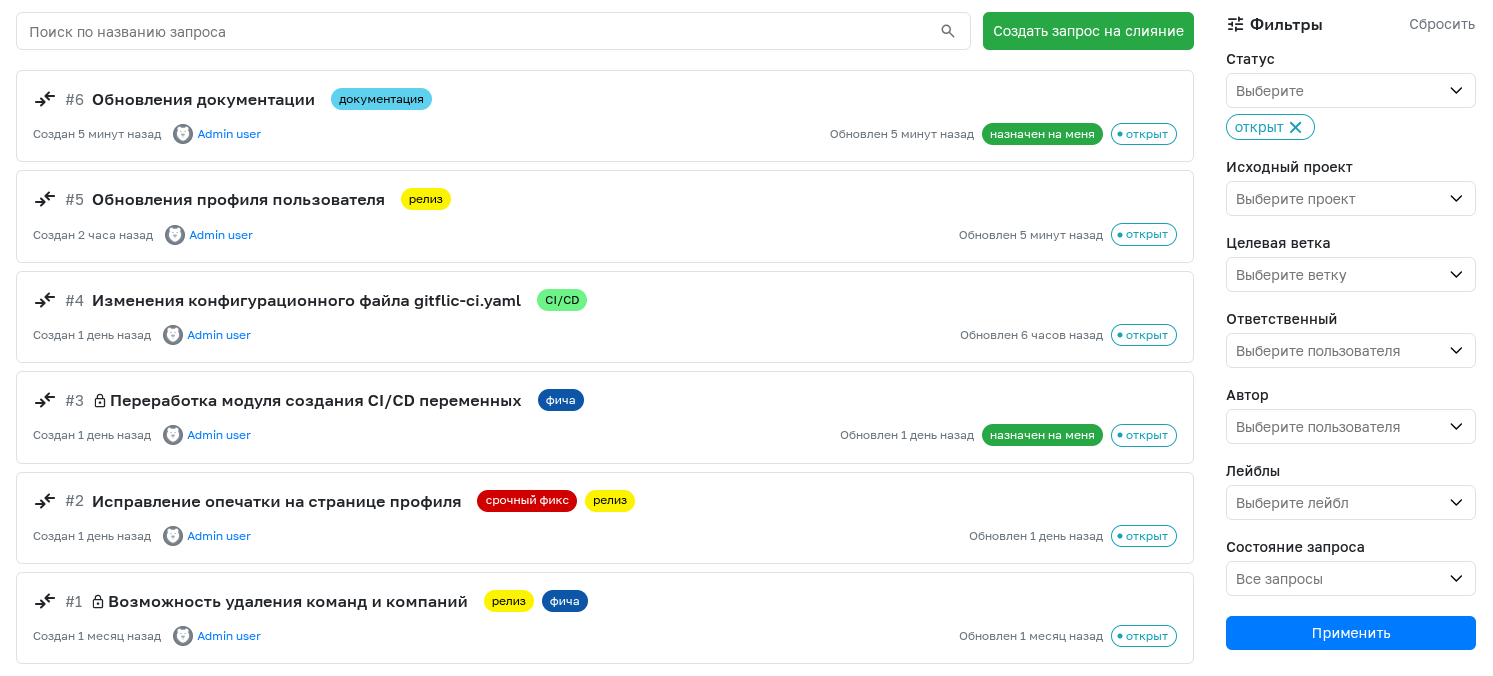
When Is This Approach Especially Useful?
This approach is particularly effective in the following scenarios:
- several developers are working on the project simultaneously;
- changes must be merged into
main,master,develop, or release branches only after approval; - the team has mandatory code review requirements before delivery;
- it is necessary to separate the roles of change author, approver, and reviewer;
- it is important to reduce the risk of untested changes being merged into the target branch.
For a development manager, this provides a managed integration process. For a technical lead, control over change quality. For a developer, a clear and transparent path for contributing code. For support and operations, more stable target branches.
Practical Workflow Scenario
Below is a typical scenario for using GitFlic within this business case.
1. Development is done in a separate branch
The change is prepared not in the target branch but in a separate working branch. This allows you to isolate the work, not disrupt the stability of the main development line, and prepare the change for review in advance.
For more details on working with branches, see the article Branches.
2. The developer creates a merge request
After completing the work in the branch, the developer creates a merge request and specifies:
- source project and branch;
- target project and branch;
- title;
- change description;
- approvers;
- reviewers;
- labels;
- linked tasks;
- additional parameters, such as deleting the source branch after completion or squash merge.
Such a request records the context of the change before it enters the target branch and makes the review process transparent to the entire team.
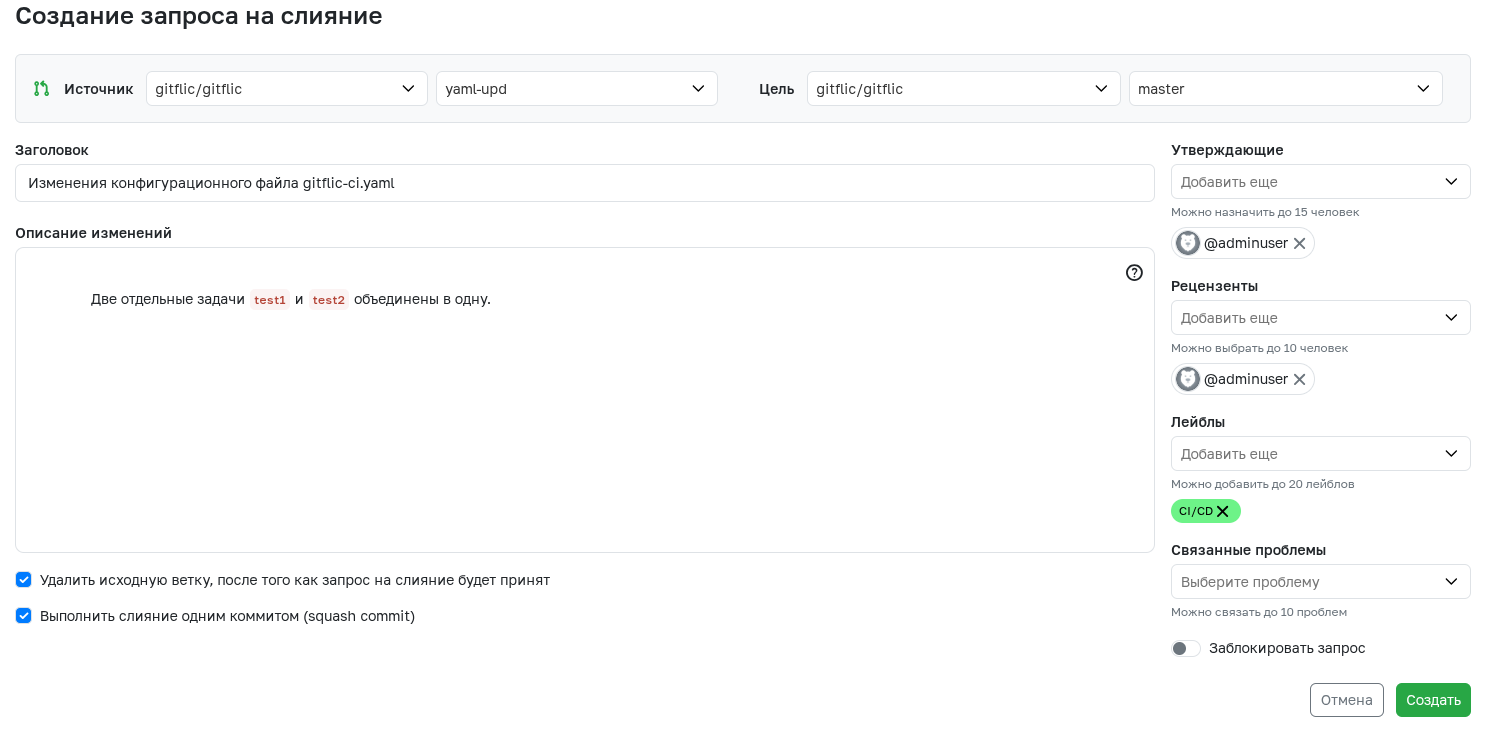
For more details on creating and viewing merge requests, see the article Merge Requests.
3. The team conducts code review and discussion of changes
After the merge request is created, the team can view the description, commit list, file changes, and associated pipelines. Discussion takes place directly within the merge request, including at the level of specific lines of changed code.
This is important for the practical application of the business case: discussion becomes part of the formal integration process, not informal communication in chat or email.
If comments have not yet been addressed, the merge request should not be completed. This allows discussion to be used as a full-fledged quality control stage.
4. Mandatory approval rules are set for target branches
To prevent a merge request from being completed without the involvement of responsible employees, GitFlic allows you to set approval rules. For each rule, you specify:
- name;
- list of approvers;
- target branch;
- minimum number of approvals.
This allows you to apply different rules to different branches. For example, one or two approvals may be sufficient for develop, while a stricter set of approvals is required for master or a release branch.
If multiple rules apply to a single branch, all of them must be satisfied. As a result, the team has not just code review "by agreement" but a formalized requirement before merging.

For more details on configuring rules, see the article Merge Request Settings.
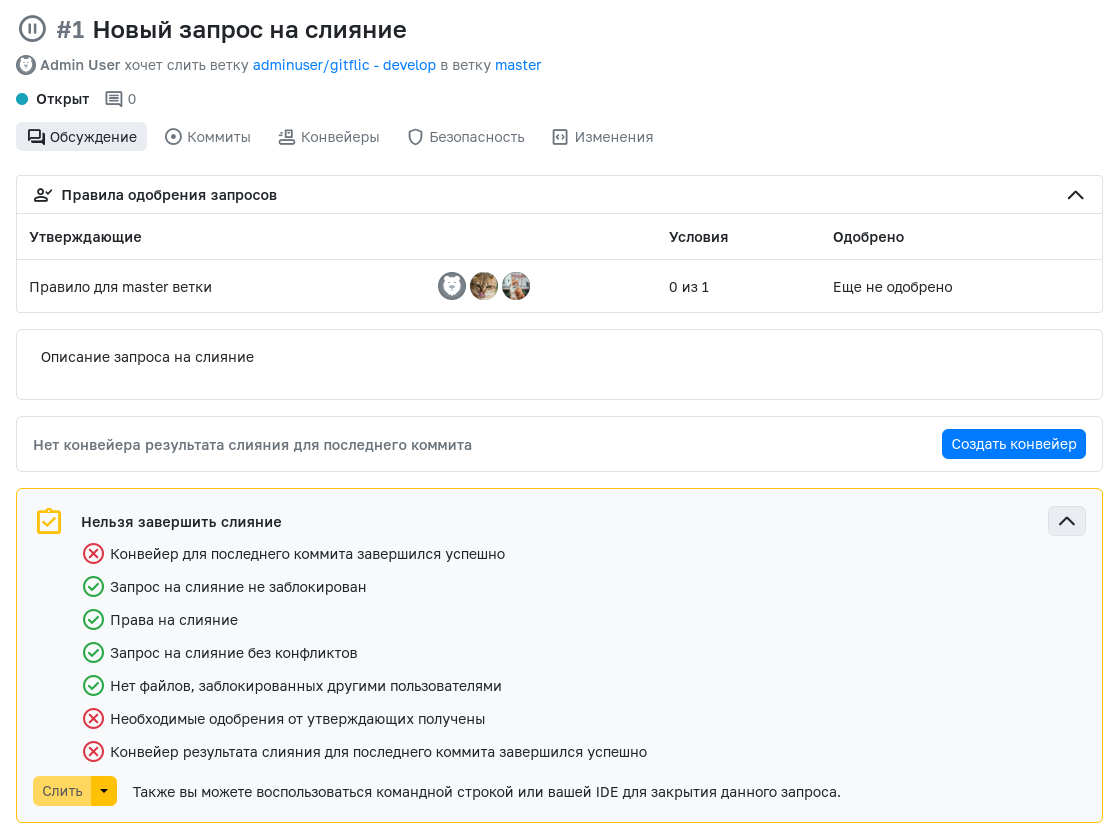
5. The merge request shows why merging is not yet available
For the practical process, it is especially important that GitFlic shows not only the mere existence of the merge request but also the conditions that have not yet been met.
In the merge request card, you can see:
- which approval rules have been applied;
- how many approvals have already been received;
- whether the basic merge requirements are met;
- which mandatory checks have not yet been passed.
This makes the merge decision transparent: the team does not guess whether changes can already be merged into the target branch but sees the specific reasons for the block.
6. New commits do not bypass an already completed review
GitFlic has additional merge request settings that help eliminate a common problem: a change was approved, but then new commits were added to the source branch.
For this purpose, you can enable the following parameters:
- reset all approvals when a new commit is pushed to the source branch;
- prevent the author from approving their own merge request;
- prevent developers who have pushed at least one commit to the source branch from approving that merge request;
- reset approvals when the target branch is changed.
In practice, this means that after a significant change to the change set, the team must re-confirm it. This approach is especially useful for critical branches and formal delivery processes.
For more details, see the article Merge Request Parameters.
7. Successful pipeline completion can be required before merging
Team approvals confirm that the change is correct from a code review perspective. But for managed integration, this is not enough: it is also important to verify the technical soundness of the changes.
In GitFlic, you can enable a check for the status of the last pipeline when completing a merge request. In this case, merging will be available only when the specified pipeline types exist for the last commit in the source branch and they have completed with a Success status.
This helps prevent changes that have not passed automated verification from being merged into target branches.
For the verification process itself, GitFlic supports two particularly useful pipeline types:
- Merge Request Pipeline — checks the new code before merging;
- Merge Result Pipeline — checks the pre-merge result and helps ensure that the final code after merging will not break the target branch.
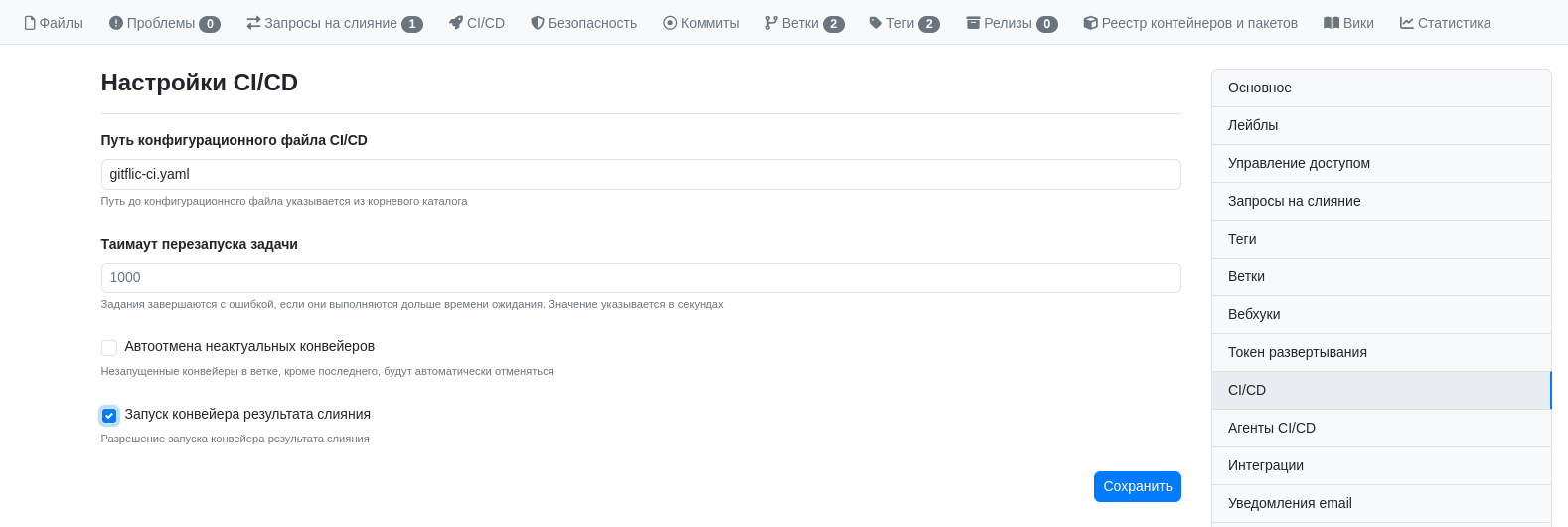
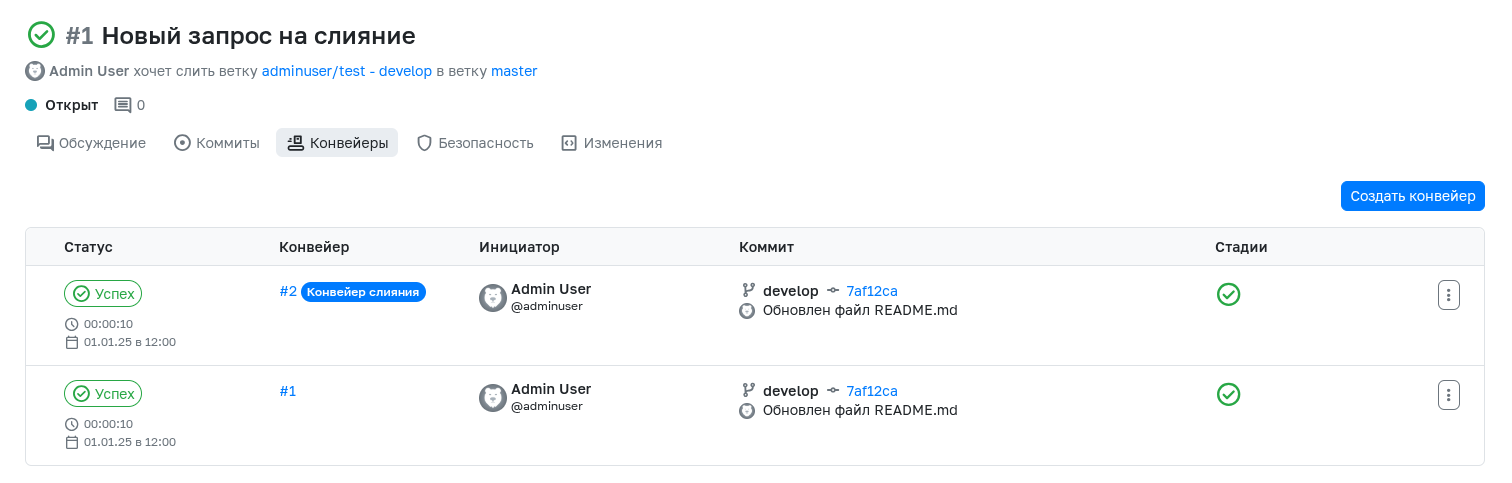
For more details, see the articles Merge Request Parameters and CI/CD Pipeline.
8. Code owners can become mandatory participants in the review
If the project has areas of responsibility by subsystem, module, or directory, you can use CODEOWNERS. To do this, create a CODEOWNERS file in the root of the repository, and then enable the request for approval from code owners on the branch protection page.
This scenario is useful in teams where different parts of the product are maintained by different specialists. A change may be technically correct, but without confirmation from the owner of that code area, it should not be merged into the target branch.
Code owner verification works independently of merge request approval rules, but the requirements from the merge request settings still apply.

For more details, see the article Codeowners.
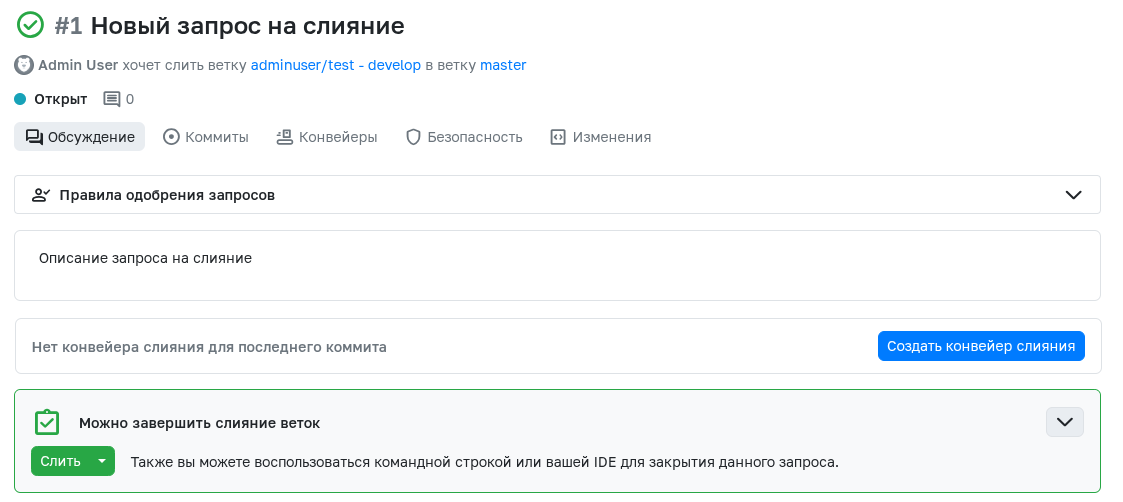
9. After all requirements are met, the change can be integrated
When the merge request has received the necessary approvals, discussions are closed, there are no conflicts, and mandatory technical checks have completed successfully, the change can be safely merged into the target branch.
This is the practical result of the business case:
- changes go through a single controlled route;
- the merge decision is made based on formal requirements;
- new commits do not bypass already completed approvals;
- target branches are protected from untested changes;
- the history of verification and approval is preserved in the system.
What the Business and Team Get
Using merge requests with mandatory checks solves several operational tasks at once.
The development manager gets a managed change integration process and transparency regarding the rules for merging into target branches.
The technical lead gets a tool that helps enforce the code review process without relying solely on verbal agreements.
The developer gets a clear path for contributing changes: separate branch, merge request, code review, checks, merge.
Support and operations get more stable target branches because changes undergo both substantive and technical verification before entering the working environment.
The customer or product owner gets more predictable delivery quality and fewer defects arising from unmanaged integration.
See Also
- Guide
- Getting Started with Git
- Branches
- Merge Requests
- Merge Request Parameters
- Codeowners
- CI/CD Pipeline
Automated translation!
This page has been automatically translated. The text may contain inaccuracies.