Reducing Manual Operations in the Delivery (Deployment) Pipeline
This guide demonstrates a practical scenario where a merge request becomes the trigger for an automated process: GitFlic automatically creates associated pipelines, runs automated tests and source code checks, selects the appropriate environment based on the target branch, and prevents merging until the required conditions are met.
This material does not replace the basic pages on CI/CD and merge requests but shows how to use GitFlic's existing capabilities within the business case of reducing manual operations in change delivery.
What Problem Does This Approach Solve?
A manual delivery process typically looks the same:
- after preparing changes, someone manually triggers a check;
- separately remembers which environment the changes need to be deployed to;
- manually starts the deployment;
- additionally verifies that all checks have indeed been completed;
- after that, decides whether the merge request can be completed.
This process has several typical problems:
- actions are repeated from request to request;
- some steps are performed "from memory";
- it is easy to mix up the target branch and its corresponding environment;
- it is difficult to ensure uniform rules for all team members;
- the final approval for merging depends not on the process but on the attentiveness of a specific person.
GitFlic allows you to move these actions into a managed scenario, where rules are defined once and then applied uniformly to all merge requests.
What Does the Target Process Look Like?
Within this scenario, the process is structured as follows:
- A developer creates a merge request.
- GitFlic automatically runs the merge pipeline and, if the setting is enabled, the merge result pipeline.
- The pipeline runs jobs for verification: automated tests, static analysis, custom quality checks.
- The logic in
gitflic-ci.yamldetermines which environment to deploy to, based on the merge request's target branch. - If the merge conditions are not met, GitFlic blocks the completion of the request.
- After all requirements are fulfilled, the request can be completed manually or switched to automatic merging.
This approach reduces the number of manual operations not through a single separate step, but by automating the entire chain from verification to delivery.
Preliminary Setup
Before using merge requests as an entry point to automation, it is recommended to enable the project's basic CI/CD options:
- auto-cancel outdated pipelines;
- run the merge result pipeline;
- if necessary, run merge trains.
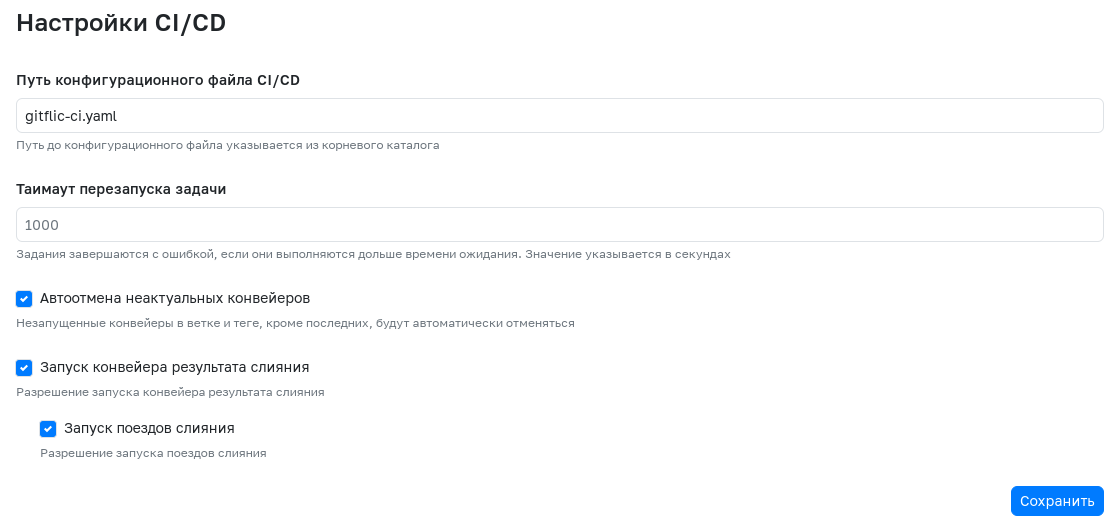
In practice, this means that when working with new changes, GitFlic will not accumulate unnecessary pipelines in a single branch, and will also be able to additionally check not only the source branch of the request but also the expected result of merging it with the target branch.
Detailed descriptions of the settings can be found in the articles CI/CD Settings and Pipeline.
Step 1. Creating a Merge Request
The process begins with creating a merge request from a working branch. In the form, the author specifies the source, target, title, description of changes, approvers, and reviewers.
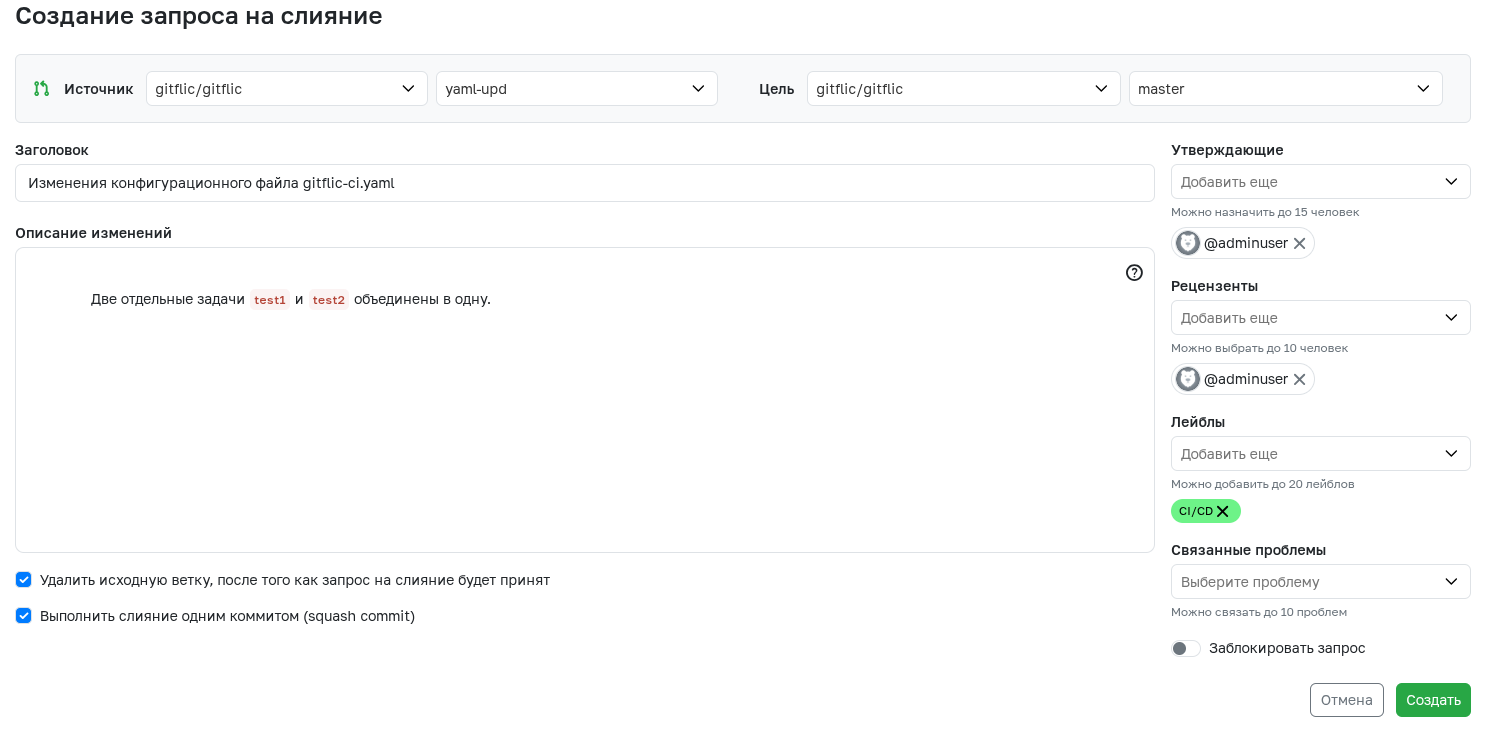
At this stage, it is important not only to describe the change but also to correctly choose the target branch, because it will later be used in the logic for:
- applying approval rules;
- checking completion conditions;
- selecting the environment for deployment;
- forming additional actions in the pipeline.
The creation form is described in detail in the article Merge Requests.
Step 2. Automatic Launch of Associated Pipelines
After creating a merge request, GitFlic automatically launches the pipelines associated with it. In the request card, you can see the pipelines for the source branch, the merge pipeline, and the merge result pipeline.
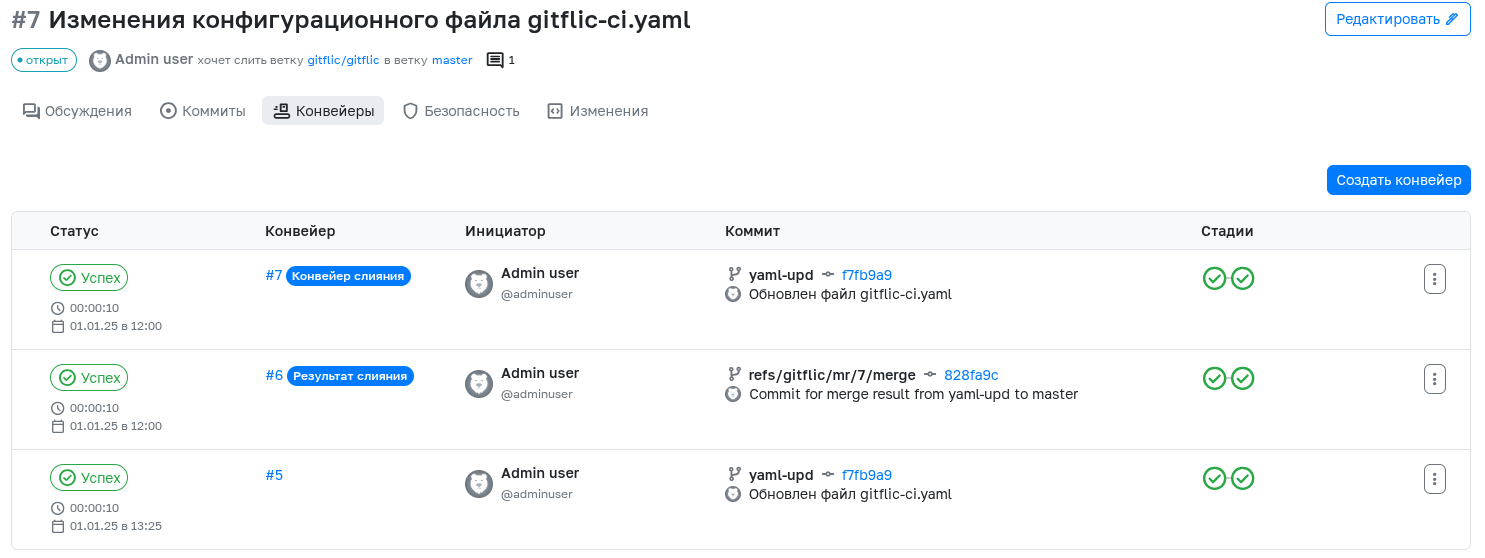
This is important for the business process for two reasons:
- the verification starts automatically, without a separate manual command;
- the readiness status of the changes becomes visible to all process participants directly in the merge request.
As a result, the merge request ceases to be just a place to discuss changes and becomes a point of quality and delivery control.
Step 3. Automatic Checks: Automated Tests and Code Analysis
Inside the pipeline, you can describe several stages, for example:
- test;
- deploy;
- finalize.
In the test stage, tasks for automated tests, linters, static analysis, and other mandatory checks are usually placed.
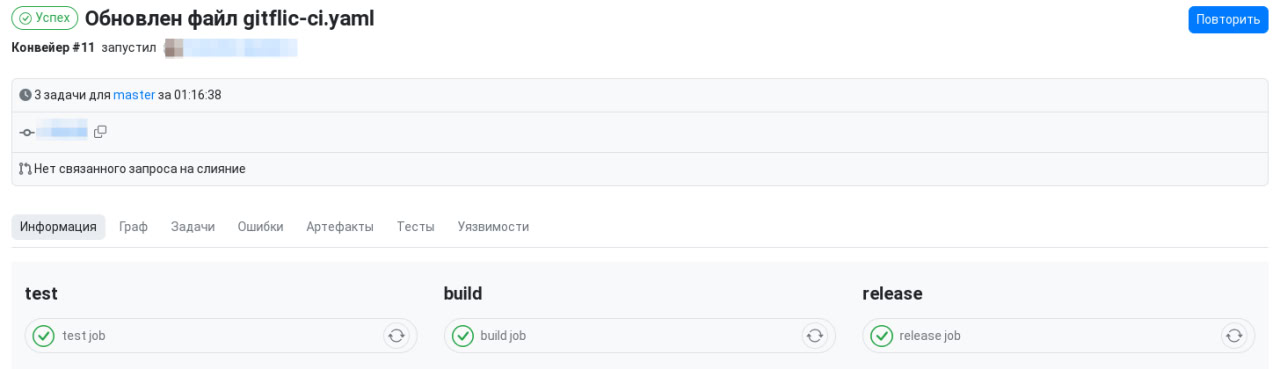
The practical meaning of this step is that the team no longer manually decides:
- which checks need to be run;
- in what order to execute them;
- whether to proceed to the next step without the result of the previous one.
All of this is described in gitflic-ci.yaml and is executed identically for each new merge request.
Step 4. Deploying to Different Environments Based on the Target Branch
The next level of automation is selecting the environment not by a person but by the pipeline logic.
For example, you can establish a rule like this:
- merge requests targeting
developare automatically deployed to the test environment; - merge requests targeting
releaseare deployed to the staging environment; - merge requests targeting
masterare deployed to the production environment.
Then, the process participant does not need to manually decide where to direct the deployment for each specific request. This decision is already embedded in the configuration.
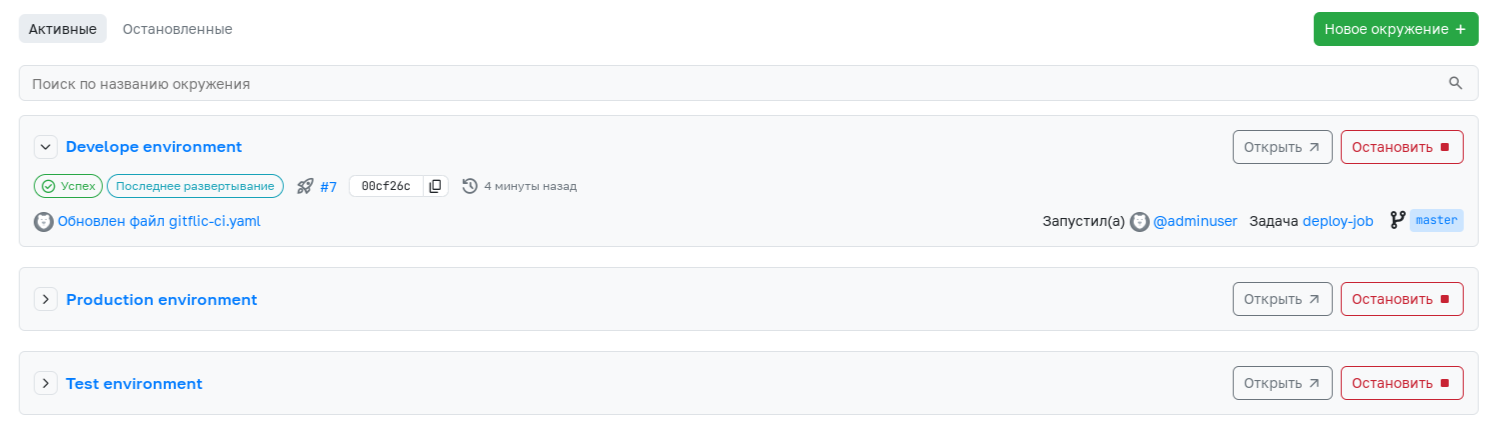
This approach yields two results:
- deployment becomes repeatable and predictable;
- the "target branch → required environment" link no longer exists only in the team's verbal agreement.
Work with environments is described in detail in the article Environments.
Step 5. Example gitflic-ci.yaml Configuration
Below is an example scenario where a merge request triggers a pipeline, then checks are performed, and deployment is selected based on the merge request's target branch.
workflow:
  rules:
    - if: $CI_PIPELINE_SOURCE == "merge_request_event"

stages:
  - test
  - deploy

Formatting check:
  stage: test
  script:
    - ./gradlew spotsCheck

Automated tests:
  stage: test
  script:
    - ./gradlew maketests

Static analysis:
  stage: test
  script:
    - ./gradlew staticAnalize

Deploy to testing:
  stage: deploy
  script:
    - ./deploy.sh testing
  environment:
    name: testing
    url: https://testing.example.ru
    deployment_tier: testing
  rules:
    - if: $CI_MERGE_REQUEST_TARGET_BRANCH_NAME == "develop"

Deploy to staging:
  stage: deploy
  script:
    - ./deploy.sh staging
  environment:
    name: staging
    url: https://staging.example.ru
    deployment_tier: staging
  rules:
    - if: $CI_MERGE_REQUEST_TARGET_BRANCH_NAME == "release"

Deploy to production:
  stage: deploy
  script:
    - ./deploy.sh production
  environment:
    name: production
    url: https://app.example.ru
    deployment_tier: production
  rules:
    - if: $CI_MERGE_REQUEST_TARGET_BRANCH_NAME == "master"
In this example:
- the pipeline is created only on an event associated with a merge request;
- checks are performed automatically;
- the deployment job is selected based on the
CI_MERGE_REQUEST_TARGET_BRANCH_NAMEvariable; - the environment is created or updated within the deployment job itself.
If the project needs to separate parameters for different environments, this can be done using CI/CD variables scoped to the environment.
Step 6. Configuring Merge Requests as a Barrier to Manual Actions
Automation works most effectively when GitFlic not only runs the pipeline but also prevents the merge request from being completed until the mandatory requirements are met.
For this purpose, it is recommended to use the following options in merge request settings:
- remove all approvals when a new commit is pushed to the source branch;
- prevent the author from approving their own request;
- prevent developers from approving their own request;
- check the status of the last pipeline when merging the request.
These settings allow you to turn the merge request into a managed checkpoint rather than a formal screen before clicking the merge button.
Step 7. Approvers for Different Target Branches
If different branches in the project have different criticality, you can configure separate approval rules for them with different compositions of Approvers and different minimum numbers of approvals.

In practice, this allows, for example:
- requiring fewer approvals for
develop; - assigning a separate, stricter set of Approvers for
master; - using your own approval path for release branches.
As a result, delivery automation is linked not only to technical checks but also to organizational rules for change approval.
Step 8. GitFlic Shows What Is Missing to Complete the Request
On the page of a specific request, GitFlic displays which conditions have already been met and which are still blocking completion.
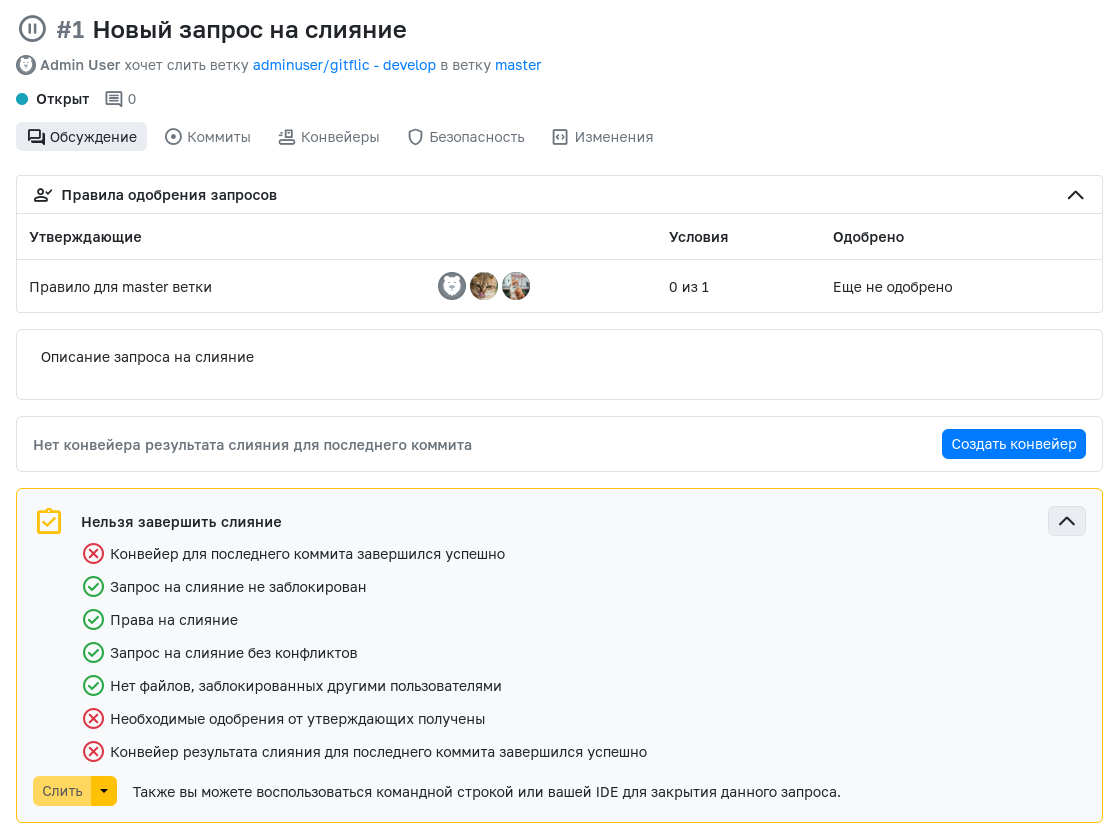
This is one of the key elements of reducing manual operations:
- no need to separately check statuses in multiple sections;
- no need to manually verify whether all Approvers have approved the request;
- no need to guess why merging is still unavailable.
GitFlic directly shows whether the requirements for approvals, permissions, absence of conflicts, and pipeline success are met.
Step 9. Additional Automation: Changelog, Service Summaries, Releases
After the main scenario with checks and deployment is established, it can be extended with additional actions.
Generating a Changelog
If the team has a policy where merge request titles reflect the meaning of changes, you can add a separate job or a custom script that will:
- retrieve information about the merge request;
- generate a changelog based on the title and description;
- save the service summary as an artifact or publish it to an external system.
Creating a Release
If a version release is formalized, you can add a release creation job. GitFlic provides a separate release configuration in gitflic-ci.yaml for this purpose. This scenario is especially convenient when, after successful checks and deployment, you need to record the delivery result as a project release.
Custom Scripts
If automation should react not only to job execution but also to project events, you can use custom scripts. This is suitable for scenarios where you need to execute additional business logic upon creating, updating, or completing a merge request.
This step already pertains to extending the scenario. It makes sense to implement it after checks, deployment, and merge request completion rules are working stably in the project.
Step 10. Practical Result for the Team and Business
With this approach, GitFlic helps solve several operational tasks at once.
For the Development Team
- fewer manual test runs;
- fewer errors when selecting the environment;
- a uniform procedure for all merge requests;
- transparent status of change readiness.
For the Manager or Technical Lead
- clear rules for approving changes into target branches;
- less dependence on a specific employee who "remembers the process";
- ability to control delivery through project settings rather than verbal agreements.
For Support and Operations
- repeatable deployment scenario;
- fewer chaotic manual actions;
- clear link between merge request, pipeline, and environment.
As a result, the merge request turns into a managed entry point for change delivery, and the pipeline becomes the primary mechanism for reducing manual operations.
See Also
- Guide
- Getting Started with Git
- Merge Requests
- Merge Request Settings
- Pipeline
- Job
- CI/CD Settings
- Environments
- Usage Examples
- gitflic-ci.yaml File Reference
- Working with Scripts
Automated translation!
This page has been automatically translated. The text may contain inaccuracies.