Centralization of Source Code and Change History in a Single Environment
In development, it is important not only to store the current project files but also to understand who, when, and why changed the code. When source code is distributed across personal computers, archives, email, messengers, or different external services, the team loses development transparency: it becomes harder to find the current version, understand the reasons for changes, control version releases, and hand over the project to other team members.
GitFlic helps to gather source code, change history, and delivery points in a single environment. As a result, the team gets a unified workspace: code is stored in a repository, changes are recorded in commits, parallel work is done in branches, important states are marked with tags, and completed versions are formalized as releases.
If a project is just starting, you can first create a new project. If the code is already stored on another platform, you can import it into GitFlic.
What Problem Does Code Centralization Solve?
In practice, the lack of a single environment leads to several typical problems:
- it is unclear which version of the code is current;
- changes depend on specific employees and their local copies;
- it is difficult to understand when and why an error occurred;
- parallel work by multiple developers leads to overlapping changes;
- before a version release, it is hard to pin down the exact composition of the delivery;
- when handing over a project to another team, part of the context and history is lost.
For business, this translates into very practical risks: delivery delays, increased time for change approval, greater dependency on individual employees, audit difficulties, and higher maintenance costs.
Centralization eliminates these risks because the project begins to live not in scattered copies but in a single managed repository with a complete change history.
What Benefits Does This Provide the Team?
Centralization of source code and change history is useful not only for developers.
For the Project Manager
The manager gains development transparency: you can see what changes have already been made, what lines of work are being done in parallel, and which version of the code is ready for release. This simplifies work planning and reduces reliance on verbal agreements.
For the Developer
It is easier for a developer to work in a shared environment: the current version of the code is always available, you can safely make changes in separate branches, view the commit history, and return to the desired project state.
For Support and Operations
It becomes easier to understand exactly which version was handed over for testing, trial operation, or production. If necessary, you can quickly compare a release with the tag and the set of changes it includes.
For the Customer and Product Owner
A single, reproducible picture of development emerges: from the current state of the source code to the formalized versions of the product. This is especially important in projects that require change control, formalized deliveries, and risk reduction when scaling the team.
Practical Business Case
Consider a typical situation. A team is developing a company's internal system. Several developers, a tester, and a manager work on the project. Before implementing a single environment, the work might look like this:
- changes are stored locally on developers' machines or in different remote storages;
- some fixes are transferred manually;
- versions for testing are assembled without clearly recording the set of changes;
- when an error is found, it is difficult to determine when it appeared;
- releasing a new version depends on who "remembers" which files need to be transferred.
After moving the project to GitFlic, the process becomes manageable:
- The source code is stored in a single project.
- Each change is recorded with a commit.
- New tasks or fixes are performed in separate branches.
- Important states of the code are marked with tags.
- The version for delivery to the customer or for testing is formalized as a release.
As a result, the team gets not just a file storage but a full-fledged change management environment.
How Git and GitFlic Help Solve This Problem
From a process standpoint, the basis of this approach is Git — a version control system. It allows you to store project files along with their change history.
If you do not yet use Git in your daily work, check out the article Getting Started with Git. It shows how to create a local repository, connect a remote project, and push code to GitFlic.
GitFlic, in turn, provides an interface for practical work with that repository. In a single project, you have access to:
- project file viewer;
- commit history;
- list of branches;
- list of tags;
- list of releases.
Thus, the entire path from storing code to formalizing the project version takes place in a single interface.
Hosting a Project in GitFlic
The project page serves as a single point of entry. Here, the team gains access to the source code, project description, and related entities.
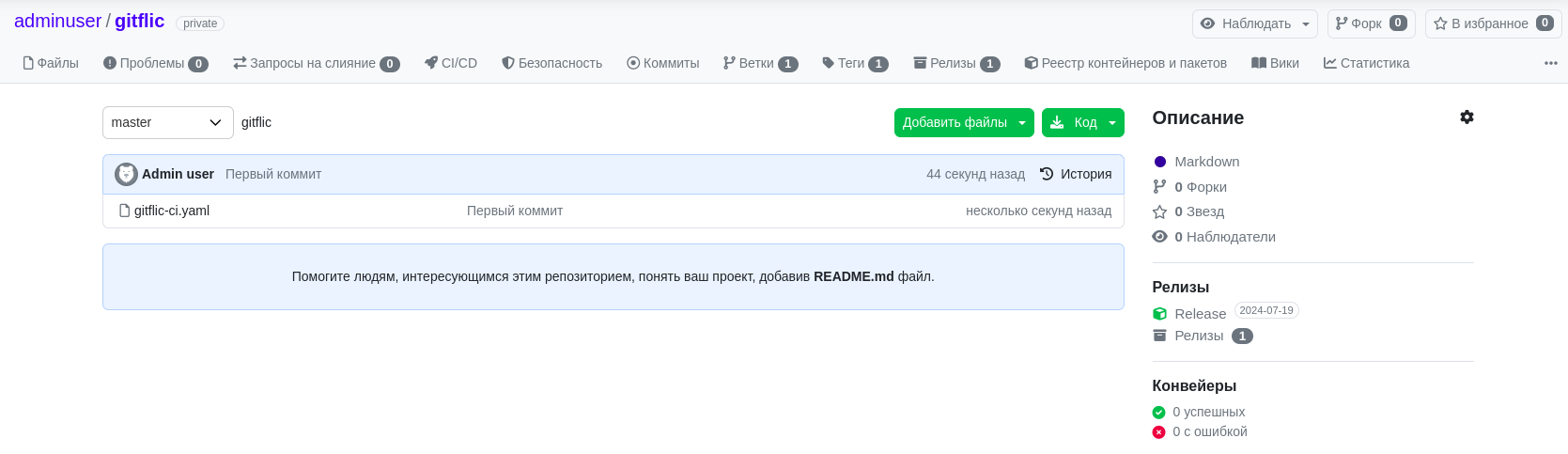
The project page displays the repository files, description, and additional information related to the development lifecycle. More details about the capabilities of the main page are described in the article Viewing a Project.
Use the list of files and directories to navigate through the repository structure.

If a project already exists on another platform, it can be moved to GitFlic using project import. This is convenient if you need to centralize ongoing development without manually transferring files.
Change History: Why Commits Are Needed
One of the key tasks of a single environment is not just to store code but to preserve the history of its evolution.
In GitFlic, the Commits tab is used for this. It allows you to view changes in chronological order and drill down into the details of each commit.
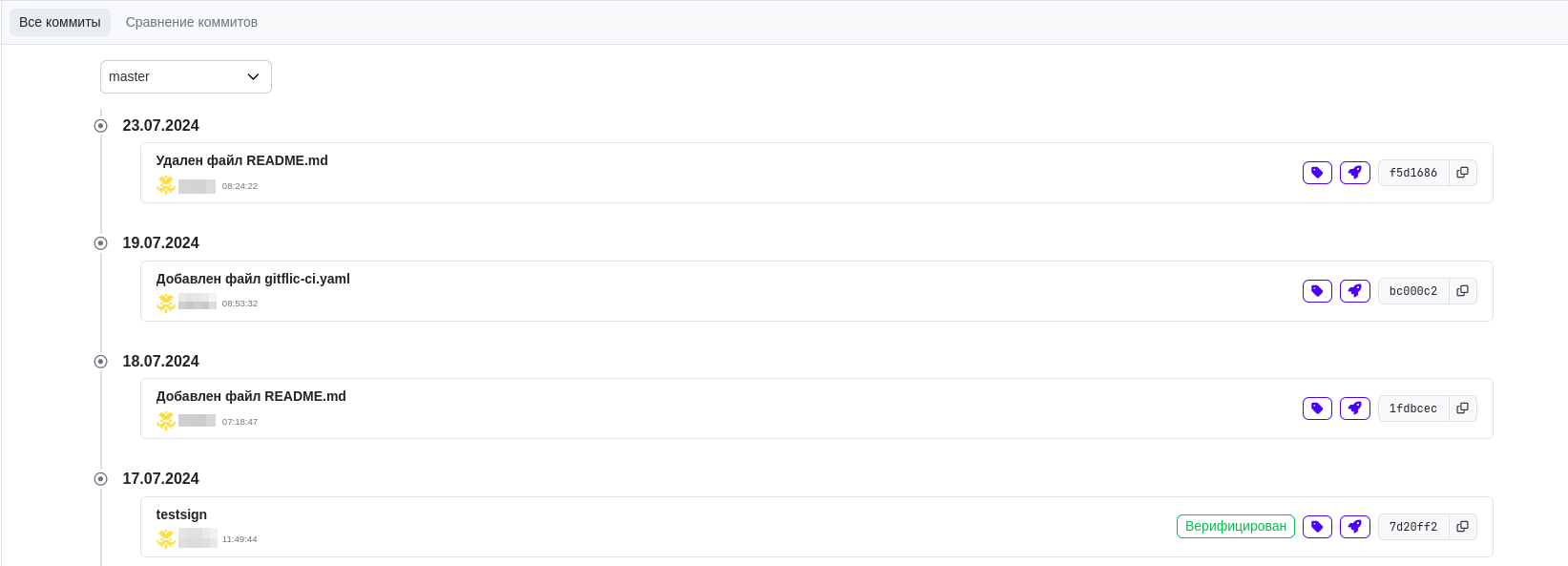
This approach helps answer important operational questions:
- when was the change made;
- who is the author of the change;
- in what sequence did the project evolve;
- after which change did the problem occur.
If work is being done in parallel on multiple fronts, you can view the history by individual branches.

As a result, commits become a working tool for analyzing changes, not just a technical record of a developer's actions. Details are provided in the article Commits.
Parallel Work Without Loss of Controllability: Branches
In real projects, changes are rarely made sequentially by one person. Typically, new tasks are being completed, defects are being fixed, and versions are being prepared for delivery simultaneously. If all changes are made in a single line of development without separation, the risk of conflicts and accidental inclusion of unfinished code in the working version increases.
Branches are used to solve this problem.
In GitFlic, the Branches tab displays the project's default branch, the main working branch, and other active branches.
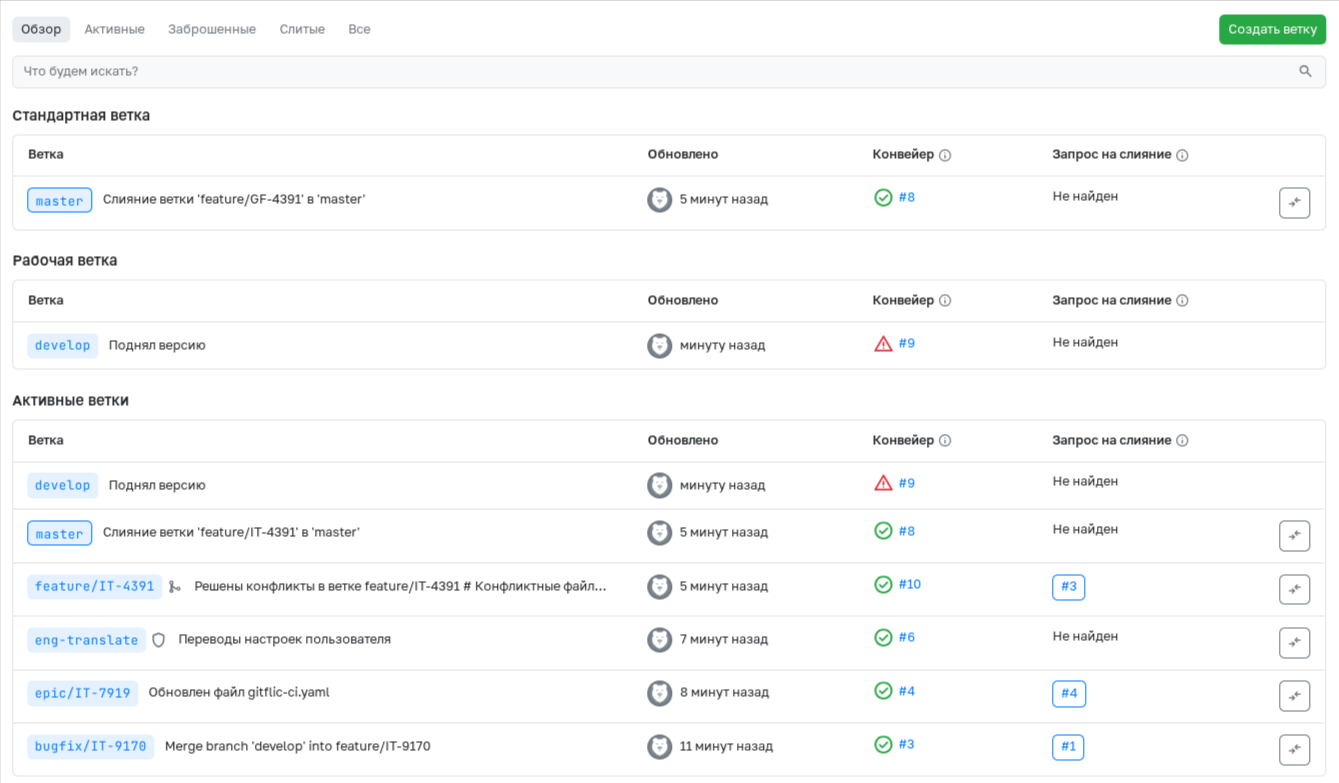
Practically, this allows you to establish a clear process:
- maintain a stable version in one branch;
- conduct current development in another;
- perform tasks, fixes, or enhancements in separate branches;
- if necessary, control which changes are ready to be merged into the main branch.
This approach reduces the risk of errors during collaboration and makes the development process more predictable. Read more about branches in the article Branches.
Marking Milestones: Tags
When you need to record an important state of a project — for example, a version for internal testing, acceptance, or delivery — tags are used.
The Tags tab displays a list of tags and the commits they are associated with.
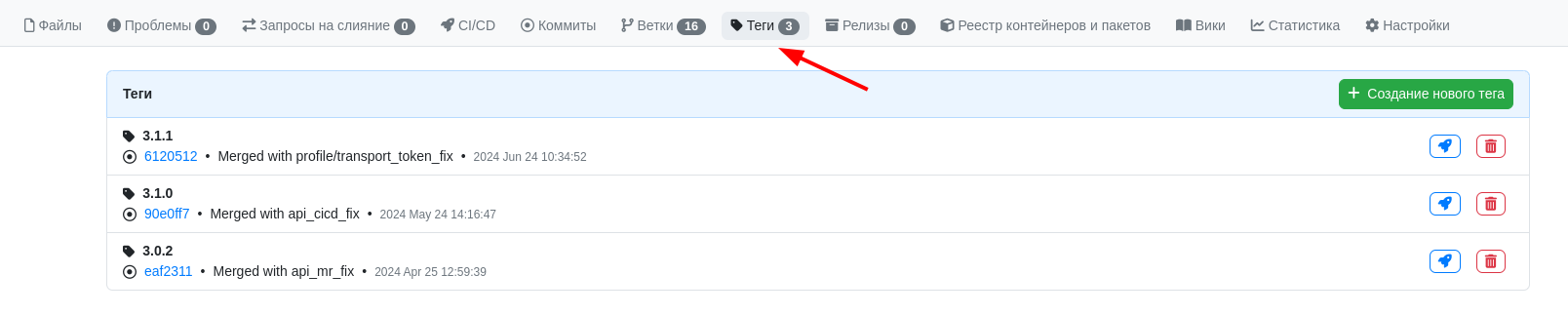
From a business process perspective, a tag solves a simple but important task: it allows you to unambiguously refer to a specific state of the code. This is especially useful when you need to:
- hand over a specific version for testing;
- record the state before deployment;
- prepare a delivery for the customer;
- separate a stable version from ongoing development.
Tags are also used as a basis for publishing a release. More details are described in the article Tags.
Formalizing Deliveries: Releases
For business, it is not enough to simply have code in a repository. It is important to be able to formalize a clear and reproducible delivery: with a version name, description, and a link to a specific state of the source code.
This task is handled by the Releases section in GitFlic.
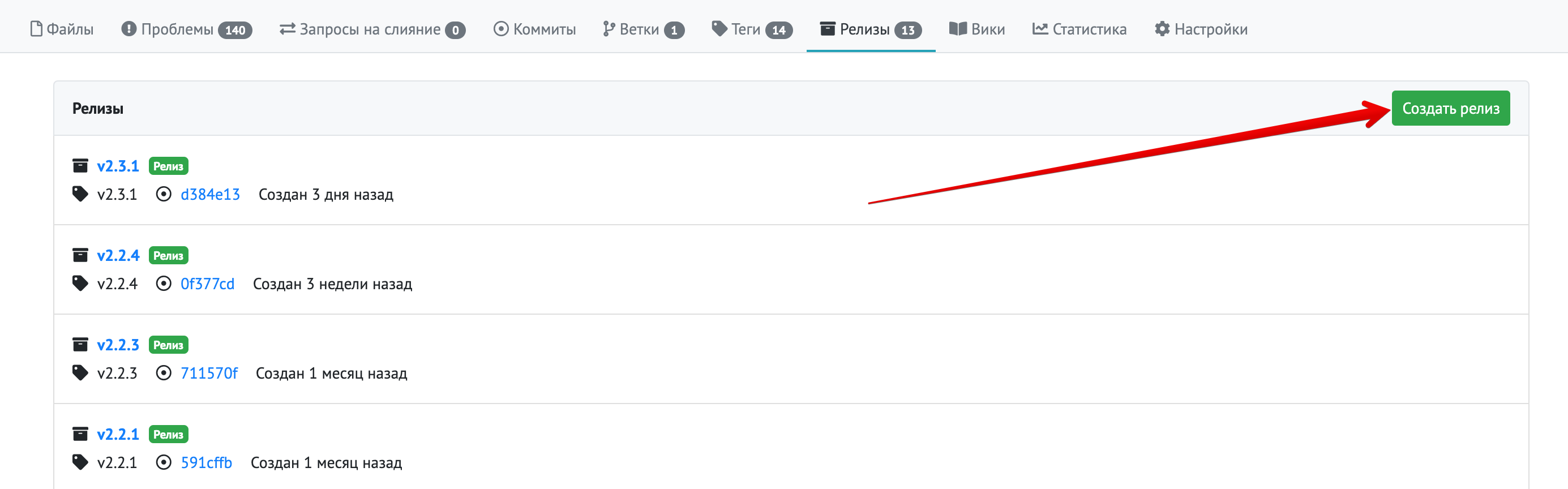
When creating a release, you can select a tag, specify a version name, add a description, attach files, and, if necessary, attach a project archive.
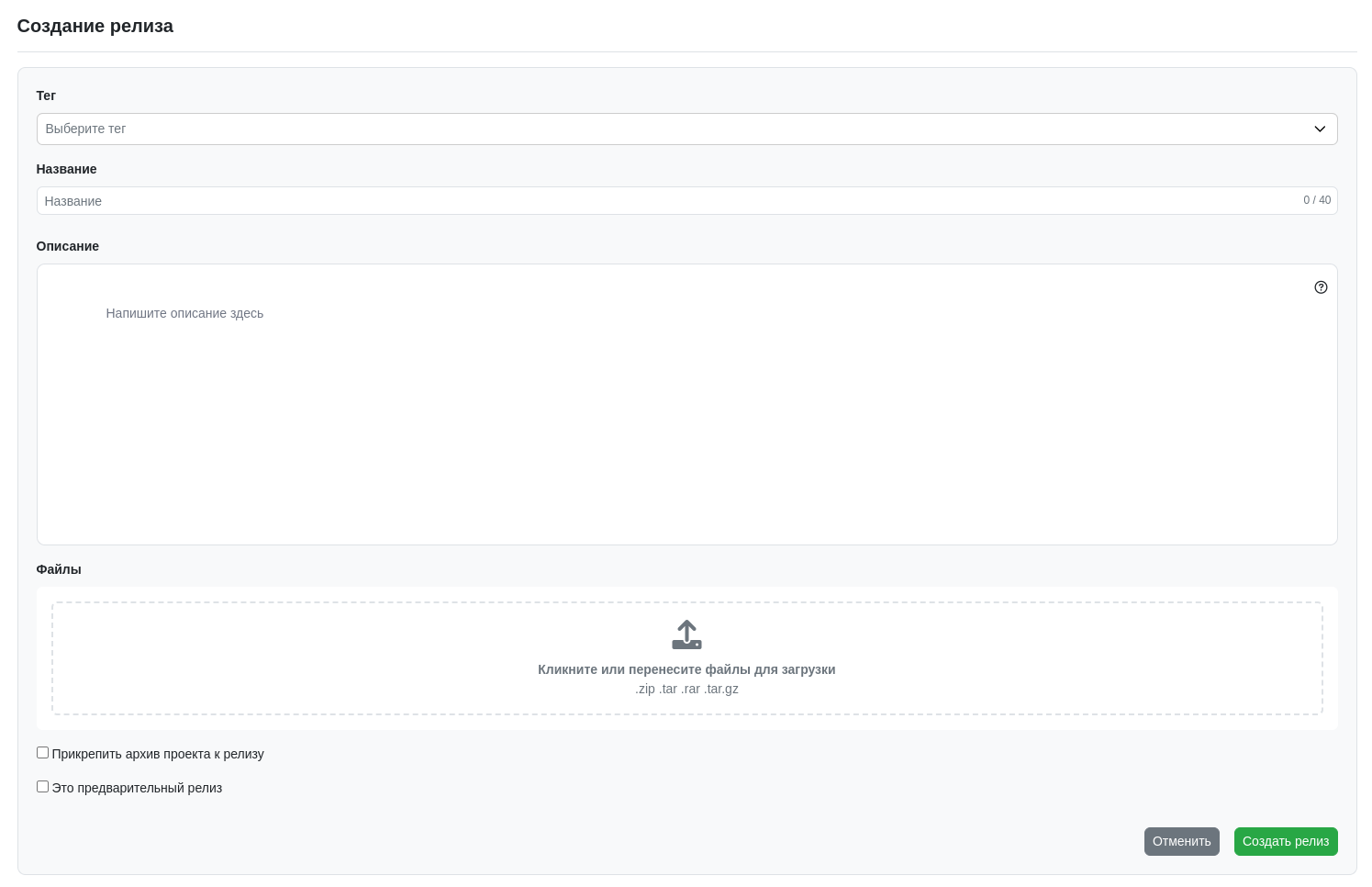
Practically, this means the team can formalize a version release:
- record exactly which code snapshot is being delivered;
- add an explanation of what is included in the release;
- attach any necessary artifacts;
- separate intermediate versions from stable ones;
- ensure reproducibility of the delivery.
It is at this stage that the business case "centralization of source code and change history in a single environment" reaches completion: the code is stored centrally, the history is transparent, and the development result is formalized as a concrete version of the product. A detailed description of the process is available in the article Releases.
Typical Usage Scenario for GitFlic in This Business Case
Below is a simple practical scenario for using GitFlic.
- The company creates a new project in GitFlic or imports an existing repository.
- Developers connect local repositories and begin making changes via Git.
- Each task or fix is performed in a separate branch.
- The results of the work are recorded in commits, forming a complete change history.
- When it is necessary to highlight a significant state of the code, the team creates a tag.
- To hand over a version for testing, internal acceptance, or to the customer, a release is created.
This scenario is suitable both for new projects and for ongoing development where you need to bring order to versions, change history, and deliveries.
What Do I Get in the End?
Using GitFlic in this business case provides several practical results:
- a single location for storing source code;
- a transparent change history for the project;
- reduced dependence on local copies and individual employees;
- the ability to conduct safe parallel development;
- clear marking of milestones and versions;
- reproducible delivery of releases;
- simplified handover of projects between teams, departments, or contractors.
In other words, GitFlic helps move from storing "just a set of files" to a managed process of development and version release.
When Is This Approach Especially Useful?
Centralization of source code and change history is especially relevant if:
- several people work on the project;
- you need to formalize the handover of versions for testing or operation;
- it is important to preserve change history and quickly resolve incidents;
- the project must be transferable between teams;
- it is necessary to reduce risks associated with manual version management;
- the organization aims to build a single internal environment for working with code.
Even for a small team, this approach quickly yields benefits by increasing transparency and reducing organizational losses. For large teams and corporate development, it becomes a baseline practice for change management.
See Also
- Guide
- Getting Started with Git
- New Project
- Project Import
- Viewing a Project
- Commits
- Branches
- Tags
- Releases
- Creating a Team
Automated translation!
This page has been automatically translated. The text may contain inaccuracies.