Installation and running in a Docker container
Running using Docker Compose
-
Install the Docker Compose plugin for Docker Engine
-
Go to the GitFlic web interface -> Admin Panel -> CI/CD
GitFlic -> Admin Panel -> CI/CD
http(s)://<Web interface address>/admin/runnersCompany settings -> CI/CD agents*
https://gitflic.ru/company/<company_name>/setting/cicd/runners -
Copy and save the URL and Token
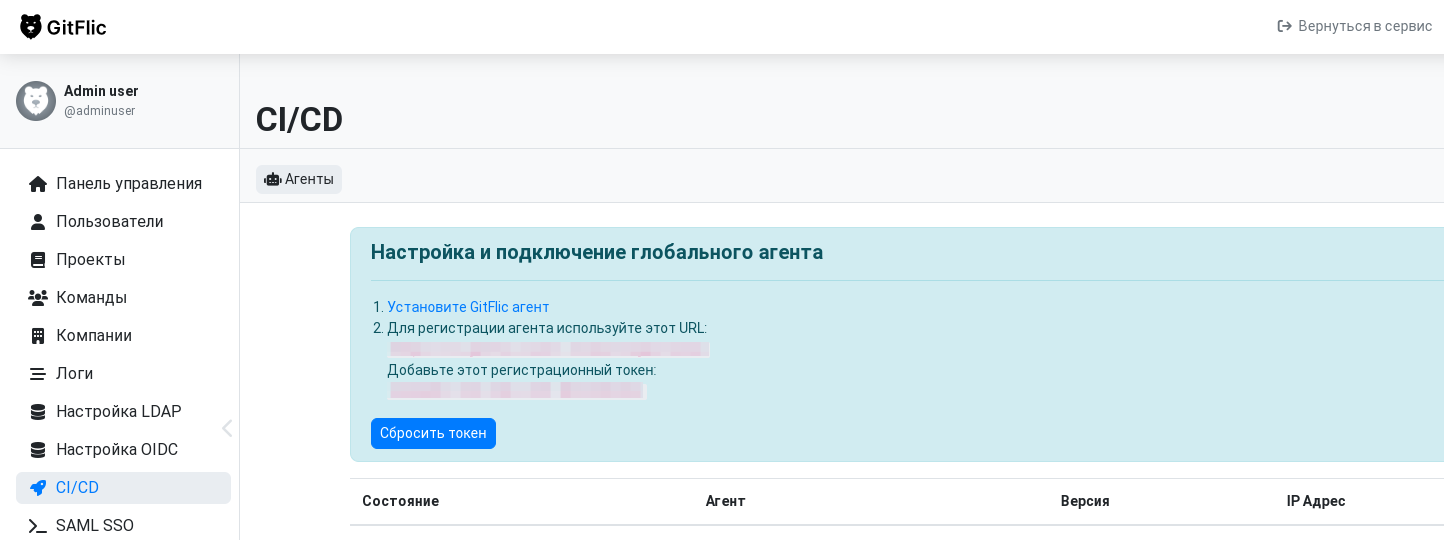
-
Create the docker-compose.yaml file and fill it with the required information
services: runner: container_name: <Container name> image: registry.gitflic.ru/company/gitflic/runner:<Agent version> environment: DOCKER_REGISTRY_USERNAME: "" # Username for Docker registry access DOCKER_REGISTRY_PASSWORD: "" # Password for Docker registry access DOCKER_REGISTRY_URL: "https://registry.gitflic.ru" # Docker registry URL REG_URL: "" # URL obtained in the GitFlic application REG_TOKEN: "" # Token obtained in the GitFlic application NAME: "" # Agent name. If empty or missing, a random name will be used TAGS: "" # Tags for the agent. If empty or missing, tags will not be set LOG_LEVEL: INFO # Logging level IN_SESSION: true # Enables or disables script execution in a single session DIDENABLE: false # Enables or disables Docker-in-Docker PRIVILEGED: false # Enables or disables privileged container mode CONCURRENCY_MODE: DEFAULT # Agent concurrency mode: DEFAULT, AUTO, CUSTOM LIMIT_OF_CONCURRENCY_TO_PROCESS_JOBS: 8 # Max concurrent jobs, only works with CONCURRENCY_MODE=CUSTOM volumes: - /var/run/docker.sock:/var/run/docker.sock # Mount Docker Engine socket - runner-config:/gitflic-runner/config # Volume for agent configuration - runner-log:/gitflic-runner/log # Volume for agent logs network_mode: host # Host network mode recommended for avoiding issues with self-signed certificates restart: unless-stopped # Container restart policy volumes: runner-config: name: runner-config runner-log: name: runner-log -
Start the agent
docker compose -p gitflic-runner -f ./docker-compose.yaml up -d
Additional parameters
When running the agent with Docker Compose, additional parameters may be provided by adding a configuration file inside the runner-config Volume. The config file must have the .properties extension.
Running without Docker Compose
Run:
docker run \
  --env "REG_URL=<URL obtained in the GitFlic application>" \
  --env "REG_TOKEN=<Agent registration token obtained in the GitFlic interface>" \
  --volume runner-config:/gitflic-runner/config \
  --volume runner-log:/gitflic-runner/log \
  --volume //var/run/docker.sock://var/run/docker.sock \
  --detach \
  registry.gitflic.ru/company/gitflic/runner:latest
Run:
docker run \
  --env "REG_URL=<URL obtained in the GitFlic application>" \
  --env "REG_TOKEN=<Agent registration token obtained in the GitFlic interface>" \
  --volume runner-config:/gitflic-runner/config \
  --volume runner-log:/gitflic-runner/log \
  --volume //var/run/docker.sock://var/run/docker.sock \
  --detach \
  registry.gitflic.ru/company/gitflic/runner:latest
Automated translation!
This page has been automatically translated. The text may contain inaccuracies.