Improving release predictability and integration quality
Note The features described in this guide — merge result pipeline and merge trains — are only available in GitFlic Enterprise.
Why such a process is needed
Even if changes build successfully and pass checks in a working branch, this does not guarantee safe integration into main or master. The main problem manifests itself at the moment of merging: code may work correctly in isolation, but after merging it may conflict with changes already in the target branch, break the build, cause tests to fail, or lead to errors in release preparation.
In an already configured GitFlic repository, this problem is solved not by a separate manual check, but by an embedded process:
- a merge result pipeline is executed for each merge request;
- it runs builds, tests, linters, and other checks;
- if necessary, merge requests go through merge trains;
- a STAGE environment may be automatically spun up for requests targeting
mainormaster; - only verified and approved changes are merged into the main branch.
This approach improves release predictability not through additional manual discipline, but because the integration rules are already built into the repository workflow.
What is already configured in the repository
Within this scenario, the repository is already prepared for managed change integration:
- the merge result pipeline is enabled;
- merge trains are enabled;
- mandatory verification rules apply to merge requests;
- approvals from approvers are taken into account;
- an additional check via a STAGE environment is used for requests targeting the main branch.
That is, this guide does not cover configuring features from scratch, but rather the team's work in an already configured process, where GitFlic predefines which actions must be performed before changes are merged.
Merge result pipeline as a mandatory integration check
The key idea of the process is that not only the source branch of the merge request is checked, but also the preliminary result of merging it with the target branch.
This allows seeing the integration result before the actual merge. If, after merging with main or master, the build breaks, tests fail, or linters are triggered, the problem is detected during development.
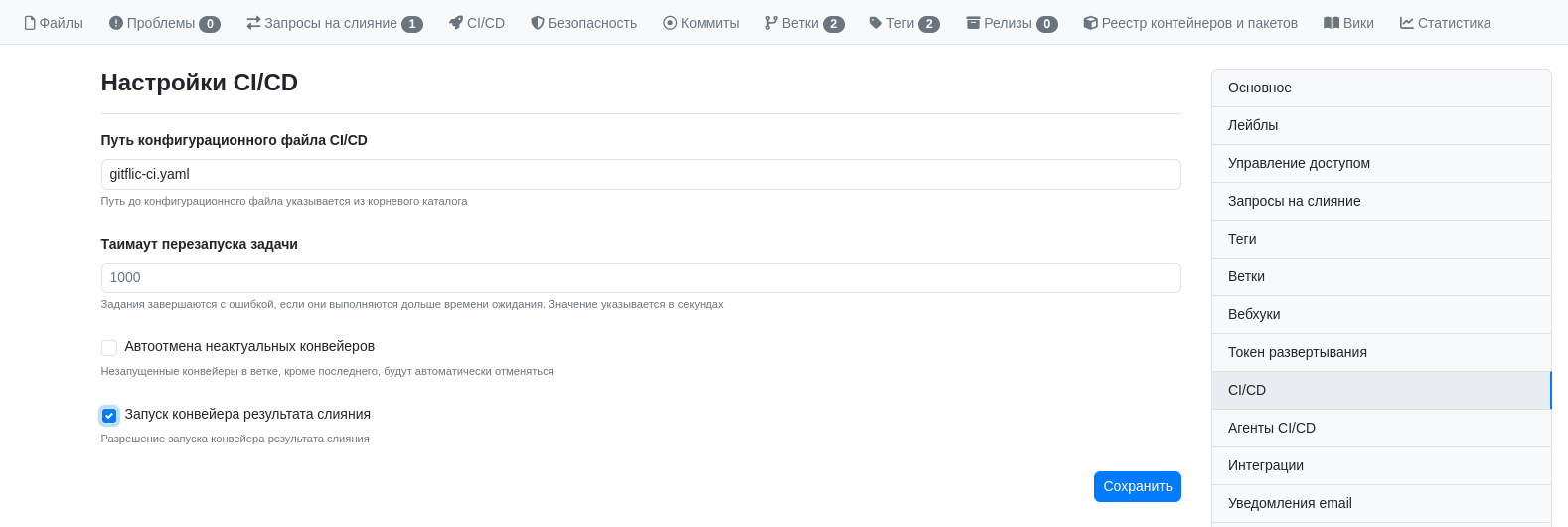
In such a process, a merge request is not considered ready just because the changes look correct in their own branch. Readiness is determined by the changes successfully passing verification in the context of the target branch.
The result is known before merging
When project rules require successful pipeline runs and the necessary approvals, GitFlic shows in advance whether the merge request can be completed.
The request card shows which conditions have already been met and which are still blocking completion. Thanks to this, the team does not have to guess whether the changes can be safely merged: the integration status, verification results, and requirement status are visible directly in the interface.
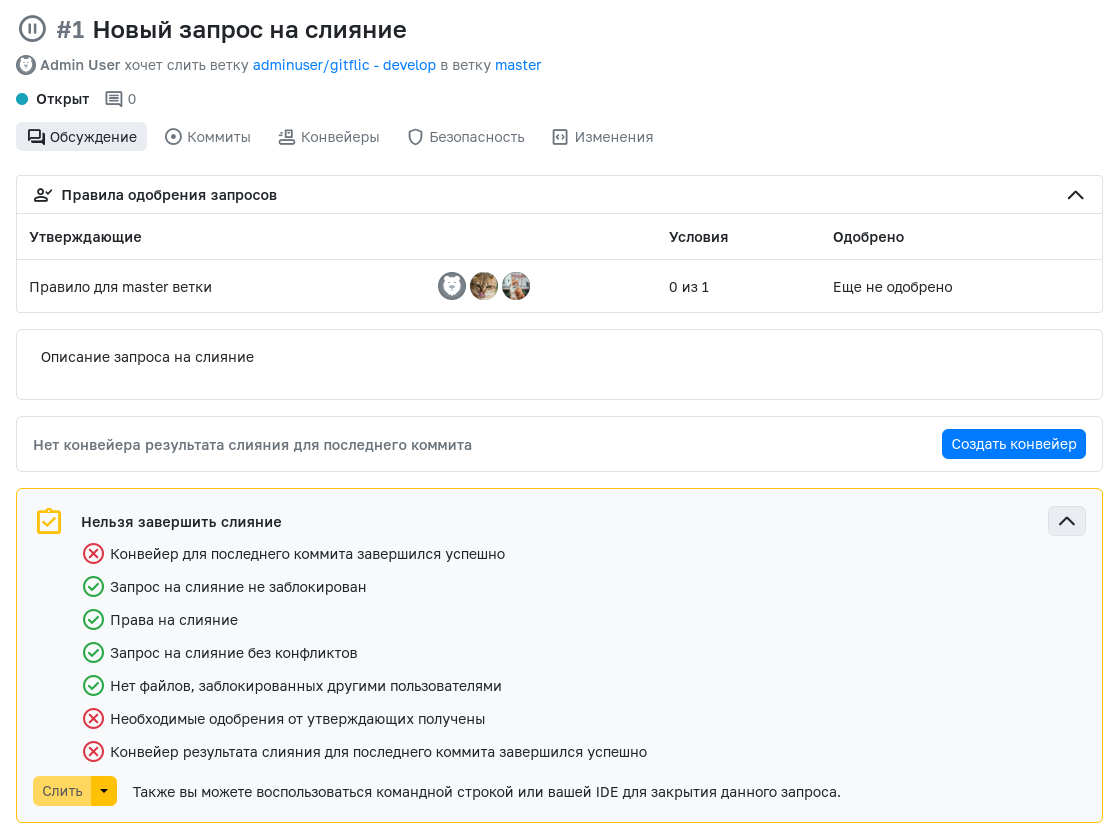
The practical meaning of this approach is simple: the integration result is known before merging, meaning that changes that have not yet passed mandatory technical and organizational checks do not enter the main branch.
Merge trains as a continuation of the merge result pipeline
If multiple developers are working on the project simultaneously, a single merge result pipeline check may not be enough. While one request is awaiting completion, other changes may already be merged into the target branch.
Merge trains solve this problem. They queue up merge requests and allow each subsequent request to be checked taking into account the changes that come before it.

As a result, the team gets a more reliable mechanism for integrating parallel changes:
- requests are not merged chaotically;
- the verification queue becomes transparent;
- the risk that a previously successful request becomes problematic due to already merged changes is reduced;
- the queue status is visible both in the request itself and in the CI/CD section.

This is especially important for the team before a release: the higher the intensity of changes, the greater the value of a process that checks not a single branch, but the actual order of change integration.
Only verified and approved changes make it into the release
Release predictability begins long before the release is formed. It appears at the moment when the team predefines which changes can even make it into the main branch.
In this process, only those changes that have:
- passed the merge result pipeline;
- not violated the merge request completion rules;
- received the necessary approvals from approvers;
- if using merge trains, successfully passed the integration queue.
This means that unstable, conflicting, or insufficiently verified changes are filtered out before they ever reach main or master. As a result, the main branch itself becomes more stable, and the future release becomes more predictable in terms of quality and composition.
Additional check via a STAGE environment
In an already configured process, a STAGE environment may be automatically used for merge requests targeting main or master. This provides an additional level of verification before changes enter the main branch and become part of the release contour.
The idea here is not to repeat all the actions of a release, but to see integration problems in advance in an environment as close as possible to the production scenario. In such a setup, defects are discovered while the merge request can still be safely refined.
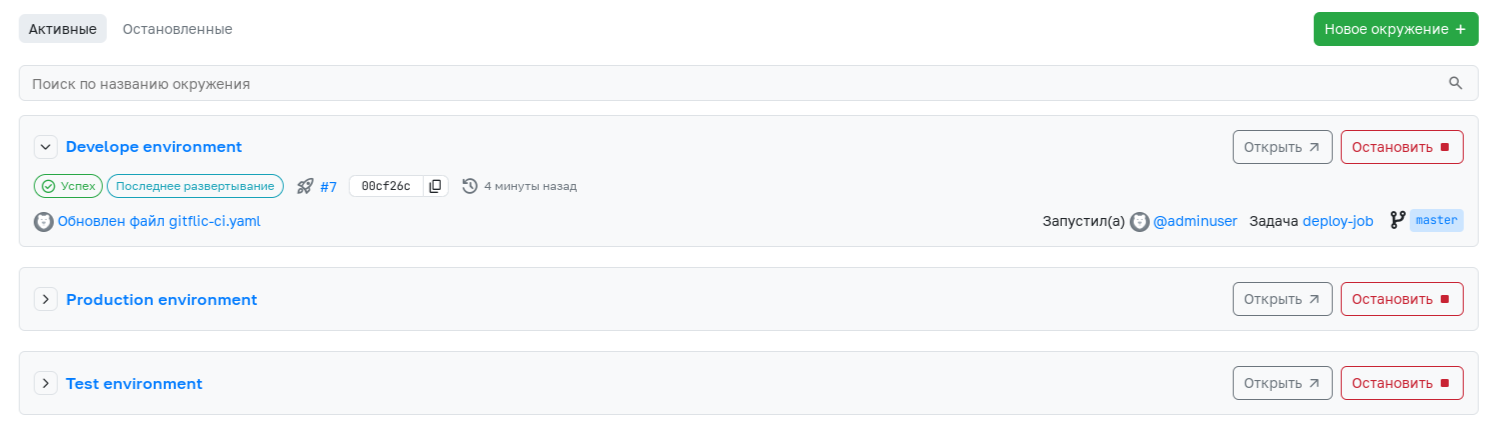
For the team, this means that some problems are shifted left in the process:
- errors are identified during development;
- integration problems are visible before merging;
- the likelihood of surprises at release time is significantly reduced.
What the team's workflow looks like
In an already configured repository, the process looks like this:
- The developer creates a merge request.
- The merge result pipeline is triggered for the request.
- The pipeline runs builds, tests, linters, and other checks.
- For requests targeting
mainormaster, a STAGE environment may be additionally used. - The request receives the necessary approvals from approvers.
- If merge trains are enabled, the request goes through the integration queue.
- Only after all conditions are met does GitFlic allow the merge to complete.
It is this sequence that makes releases more predictable: not just "code that passed review" enters the main branch, but changes that have already undergone integration verification into the target branch.
What the team and business gain
Such a process yields several practical effects.
For the development team: - fewer unexpected problems after merging; - clear criteria for merge request readiness; - a transparent integration queue during parallel work; - problem identification before changes reach the main branch.
For the manager and process owner: - a more stable main branch; - higher predictability of release composition; - lower risk that unstable changes will make it into the release; - fewer manual decisions at the critical integration point.
For the release process: - only verified changes make it into the release; - the likelihood of emergency fixes after merging is reduced; - integration quality becomes part of the process, not a separate manual activity.
Conclusion
GitFlic improves release predictability and integration quality not through a single setting, but through a combination of already configured mechanisms: the merge result pipeline, merge request completion rules, approvals from approvers, merge trains, and, if necessary, a STAGE environment.
As a result, the team learns the integration result before merging, not after it. This makes the main branch more stable and the release more manageable and predictable.
See also
- Managed change integration via merge requests
- Automation of building, testing, and publishing results via CI/CD
- Forming a reproducible release contour
- Reducing manual operations in the delivery (deployment) pipeline
Automated translation!
This page has been automatically translated. The text may contain inaccuracies.