Accelerating change delivery through merge request automation
Note In an already configured process, additional GitFlic Enterprise features may be used to enhance integration control. This guide focuses on the automatic triggering of a pipeline for a merge request, selecting an environment based on the target branch, and automatic merging according to predefined rules.
This guide logically continues the scenario Reducing manual operations in the delivery pipeline: there the main focus is on reducing manual actions in the delivery pipeline, while here it is on how to accelerate the path of a change to the target branch by automating the merge request itself.
Active roles
This scenario is primarily useful for the following roles:
Why accelerate delivery specifically through merge requests
When a project already has change verification rules in place, further acceleration of delivery usually hits a wall not because of code quality, but because of the number of manual actions between creating a change and its merging into the target branch.
Delays most often occur at the same points:
- the pipeline is triggered not as part of the process, but as a separate action;
- reviewers wait for the author to manually prepare results;
- the environment for intermediate deployment is chosen manually;
- after successful checks, a manual decision is still required as to when exactly to complete the merge request.
In an already configured GitFlic repository, these steps can be built into a single workflow around the merge request. Acceleration is then achieved not by weakening control, but by making control part of the automated process.
What is already configured in the repository
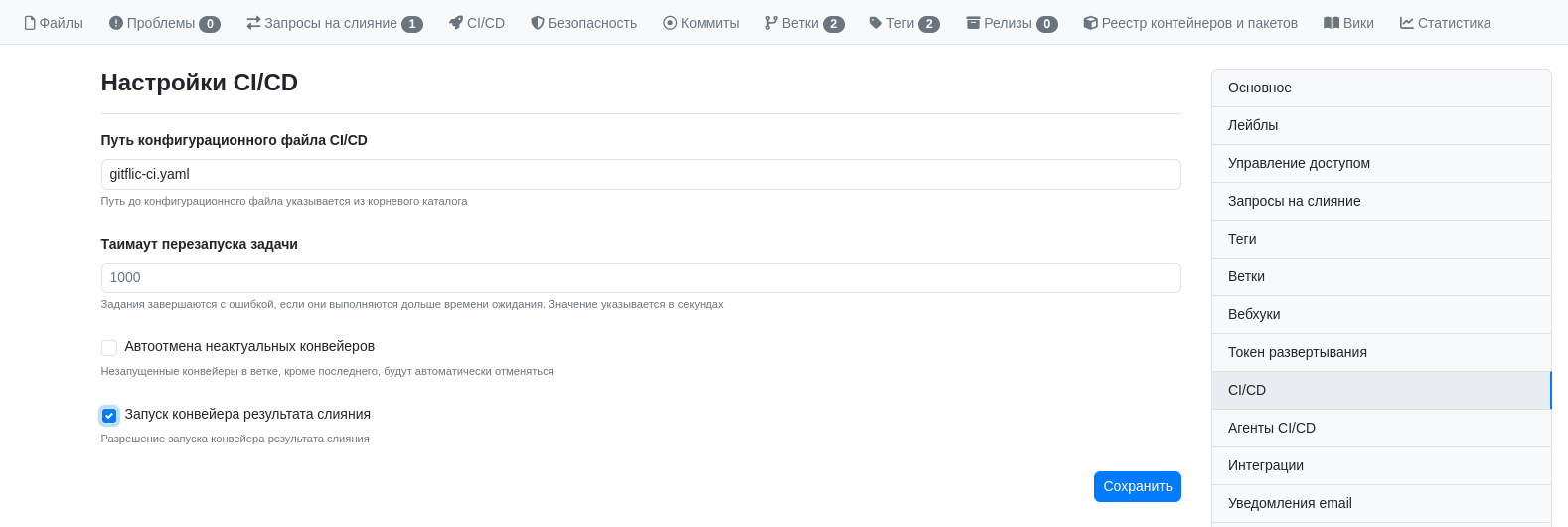
Within this scenario, the project is already prepared for managed change delivery:
- for new merge requests, an associated pipeline is automatically triggered;
- the pipeline runs builds, automated tests, linters, and other checks;
- the pipeline logic determines which environment to direct changes to based on the target branch;
- completion conditions are enabled for the request;
- automatic merging is allowed, which only triggers after all specified rules are met.
This approach is convenient because the team works not with a set of disparate actions, but with one clear route: create a merge request, wait for automatic checks, if necessary obtain intermediate deployment results, and let the system complete the merge when ready.
The merge request as the delivery launch point
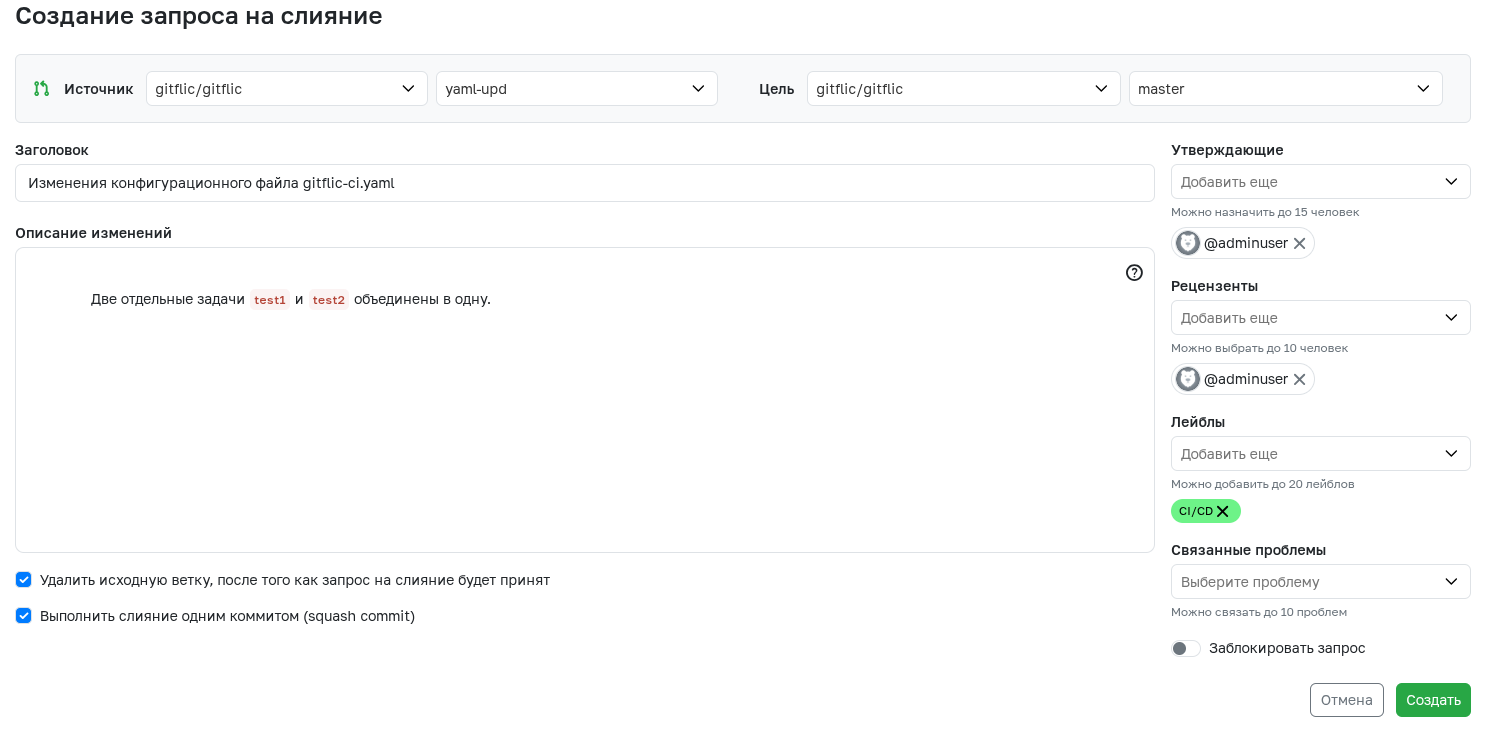
The process begins with creating a merge request. It is at this moment that GitFlic receives all the necessary information for further automation:
- from which branch the changes are coming;
- which branch they should go into;
- which rules apply to the target branch;
- which checks and actions must be performed before completion.
This is important for the team for two reasons.
First, the merge request becomes not just a form for approving changes, but an entry point into an automated process. Second, it is the target branch that sets the context for subsequent work: which set of checks is required, which environment should be used, and whether the request can be completed automatically after all conditions are met.
Automatic pipeline triggering without a separate command
After a merge request is created, GitFlic automatically triggers the associated pipeline. This removes one of the most frequent operational delays: the author does not need to separately initiate verification or remind other process participants that changes are ready for evaluation.
In the merge request card, process participants see that verification is already underway, which jobs are being executed, and the current status of the pipeline.
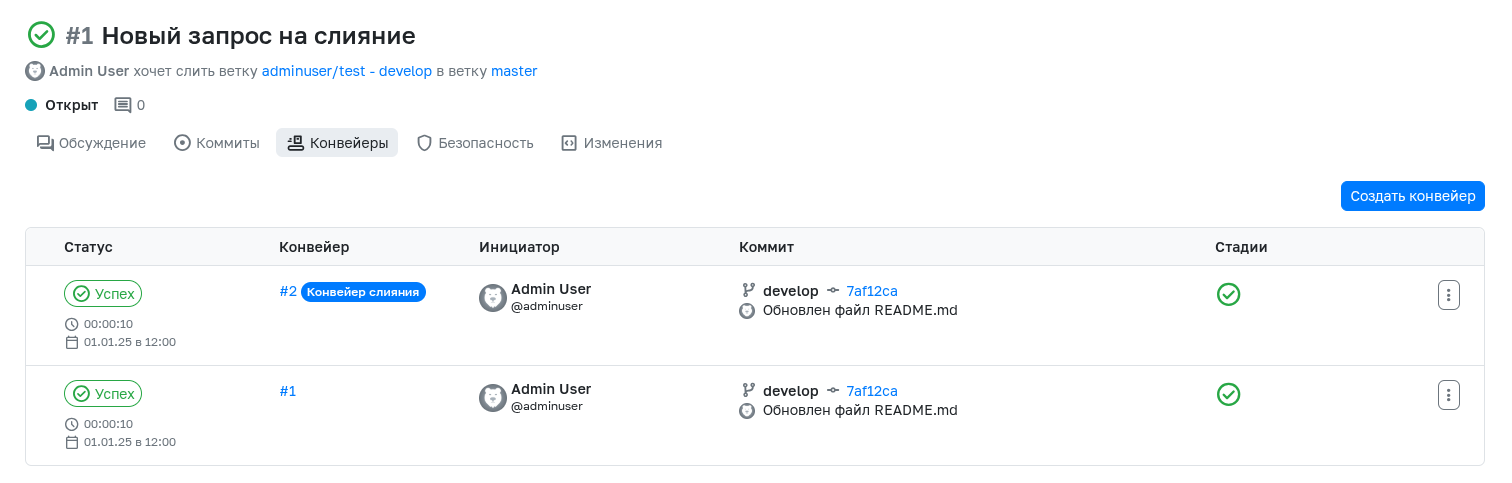
For accelerating delivery, this means the following:
- verification begins immediately after the request is created;
- there is no pause between formalizing the change and technical validation;
- the developer gets a signal sooner as to whether the change is ready for the next step;
- the team lead and reviewers see the request status without additional calls and clarifications.
Checks are performed as part of the process, not by agreement
After the pipeline is triggered, GitFlic executes the set of checks already embedded in the project process. Typically, this includes:
- build;
- automated tests;
- linters;
- additional source code checks;
- custom checks that the team considers mandatory.
This saves time not only because checks start automatically, but also because the team does not waste effort constantly agreeing on the same question: what exactly needs to be checked before merging.
If a check fails, the merge request does not proceed further in the process. If all conditions are met, it becomes a candidate for completion without unnecessary manual steps.
Deployment to the required environment is determined by the target branch
In an already configured process, the pipeline logic can select the environment not manually, but automatically — based on which branch the merge request targets.
In practice, this allows building a clear scenario:
- changes for one target branch go to one environment;
- changes for another branch go to another;
- the team itself does not waste time choosing the delivery route for each request individually.
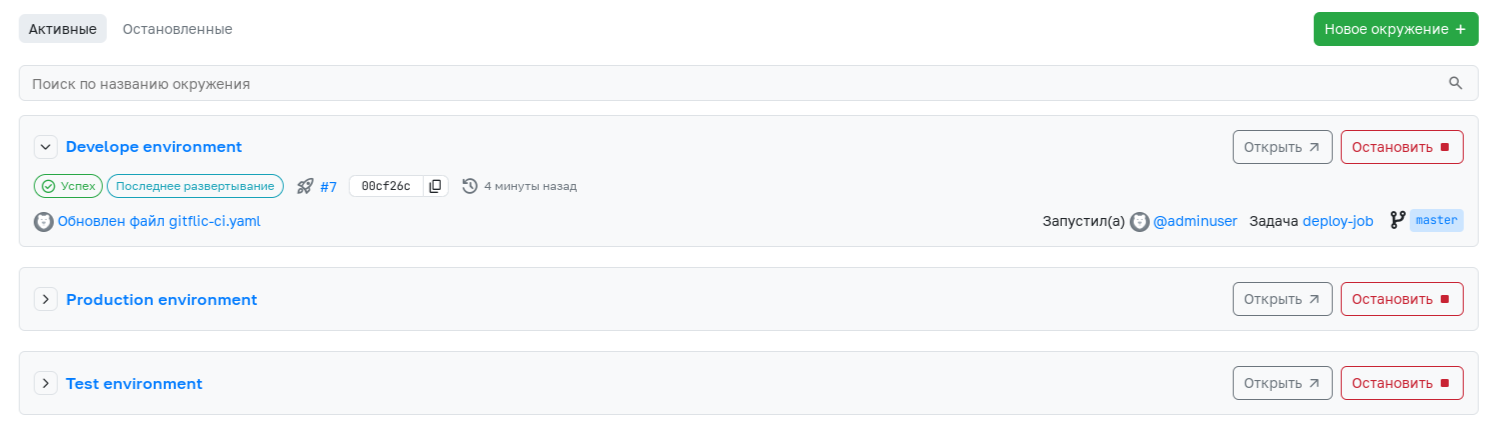
This is especially important in teams where multiple streams of changes are being worked on simultaneously. When the environment selection logic is already fixed in the pipeline, delivery acceleration is achieved without losing manageability: the correct route is chosen quickly, but according to predefined rules.
It is at this step that it is convenient to refer to the previous guide Reducing manual operations in the delivery pipeline, which details the logic for automatically selecting environments and pipeline actions around change delivery.
Automatic merging completes the process according to predefined rules
After the pipeline passes, all checks are performed, and the rules are applied to the merge request, GitFlic can use automatic merging.
The meaning of this mechanism is that after all required conditions are met, the request does not wait for additional manual action. The system completes the merge itself — but only when all specified rules are satisfied.
In practice, this yields two important effects:
- the team does not waste time manually completing an already prepared request;
- delivery acceleration does not disrupt manageability, because auto-merge does not bypass checks but, on the contrary, depends on them.
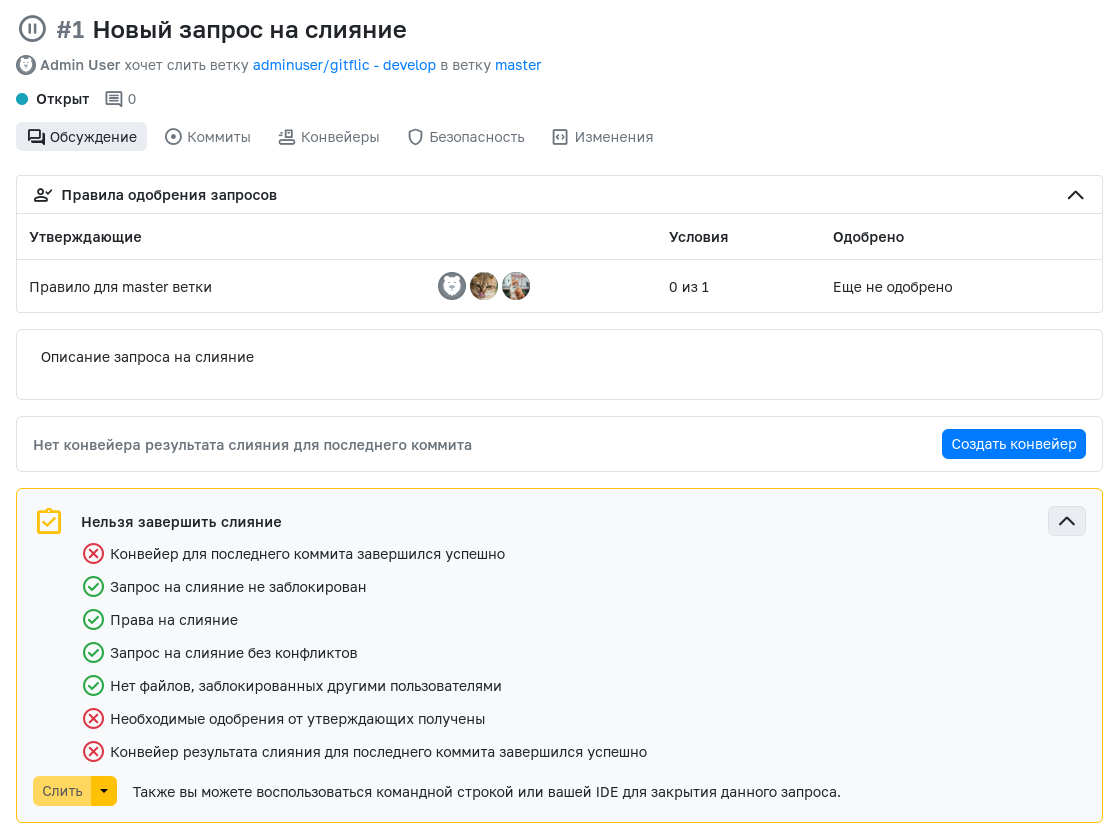
In an already configured process, automatic merging becomes not "acceleration bypassing the rules" but the final step of the route, in which the system itself waits for:
- absence of conflicts;
- completion of discussions;
- mandatory approvals;
- successful pipeline completion.
Why this approach accelerates delivery without losing manageability
The key value of this scenario is that speed arises not by skipping stages, but by automating the transitions between them.
The team saves time because:
- the merge request itself triggers the pipeline;
- checks are already built into the process;
- the deployment direction is determined automatically;
- completion conditions are known in advance;
- after they are met, the request can be completed without manual intervention.
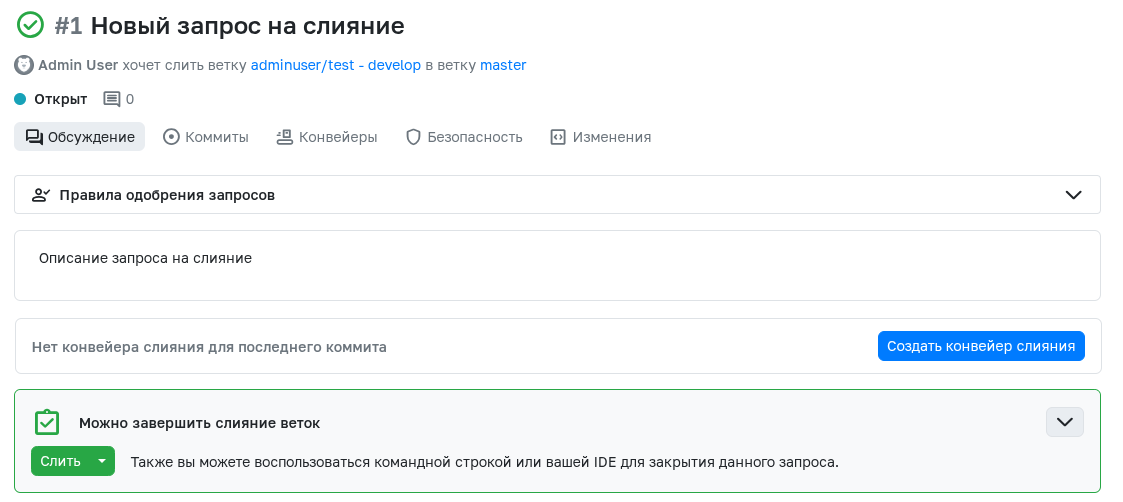
As a result, the change flow becomes shorter in time but not poorer in quality. Manageability is preserved because all critical conditions do not disappear but are translated into formal rules and statuses that GitFlic applies automatically.
What a unified workflow looks like
In an already configured repository, the process looks like this:
- The developer creates a merge request.
- GitFlic automatically triggers the associated pipeline.
- The pipeline runs builds, automated tests, linters, and other checks.
- The required environment for intermediate deployment or delivery is determined by the target branch.
- GitFlic checks whether the request completion conditions are met.
- After the rules are satisfied, automatic merging is triggered.
It is this sequence that allows accelerating change delivery: each next step begins not after manual approval, but after receiving the necessary automatic signal.
What the team and business gain
For the development team:
- a faster path from code change to merging into the target branch;
- fewer manual actions around verification and request completion;
- an earlier and more transparent signal of change readiness;
- fewer delays between successful verification and actual merging.
For the engineering manager:
- a more even and predictable flow of merge requests;
- less manual control in typical situations;
- clear criteria by which the system itself can complete the change;
- delivery acceleration without weakening quality rules.
For QA / SDET and the platform team:
- checks become part of the standard route;
- environments and pipeline actions are applied according to uniform rules;
- quality and speed no longer conflict with each other.
Conclusion
GitFlic allows you to accelerate change delivery through merge request automation: the pipeline is triggered immediately after the request is created, checks are performed without manual initiation, the required environment is selected based on the target branch, and the request can be completed via automatic merging according to predefined conditions.
As a result, the team reduces the time it takes for a change to reach the target branch but does not lose process manageability. On the contrary, manageability becomes stronger because critical rules no longer depend on manual discipline and ad-hoc agreements.
See also
- Reducing manual operations in the delivery pipeline
- Developer
- Testing engineer (QA / SDET)
- Platform engineer / DevOps
- Engineering manager
Automated translation!
This page has been automatically translated. The text may contain inaccuracies.